Shelf
Your stuff, one tap away
The small things you keep needing and can never remember - door codes, Wi-Fi passwords, addresses, IBANs, promo codes, vouchers, the command you paste every Monday or your favourite prompt template - are now available in Shelf, one tap from your clipboard on every Apple device you own. Everything is encrypted on your device before it is stored and synced through your own iCloud. No account to create, no server of mine in between.

One purchase. No subscription, ever.
iPhone · iPad · Mac · Apple Watch
Requires iOS / iPadOS / macOS / watchOS 26 or later
Why Shelf
The security of a password manager, the speed of a sticky note - and:
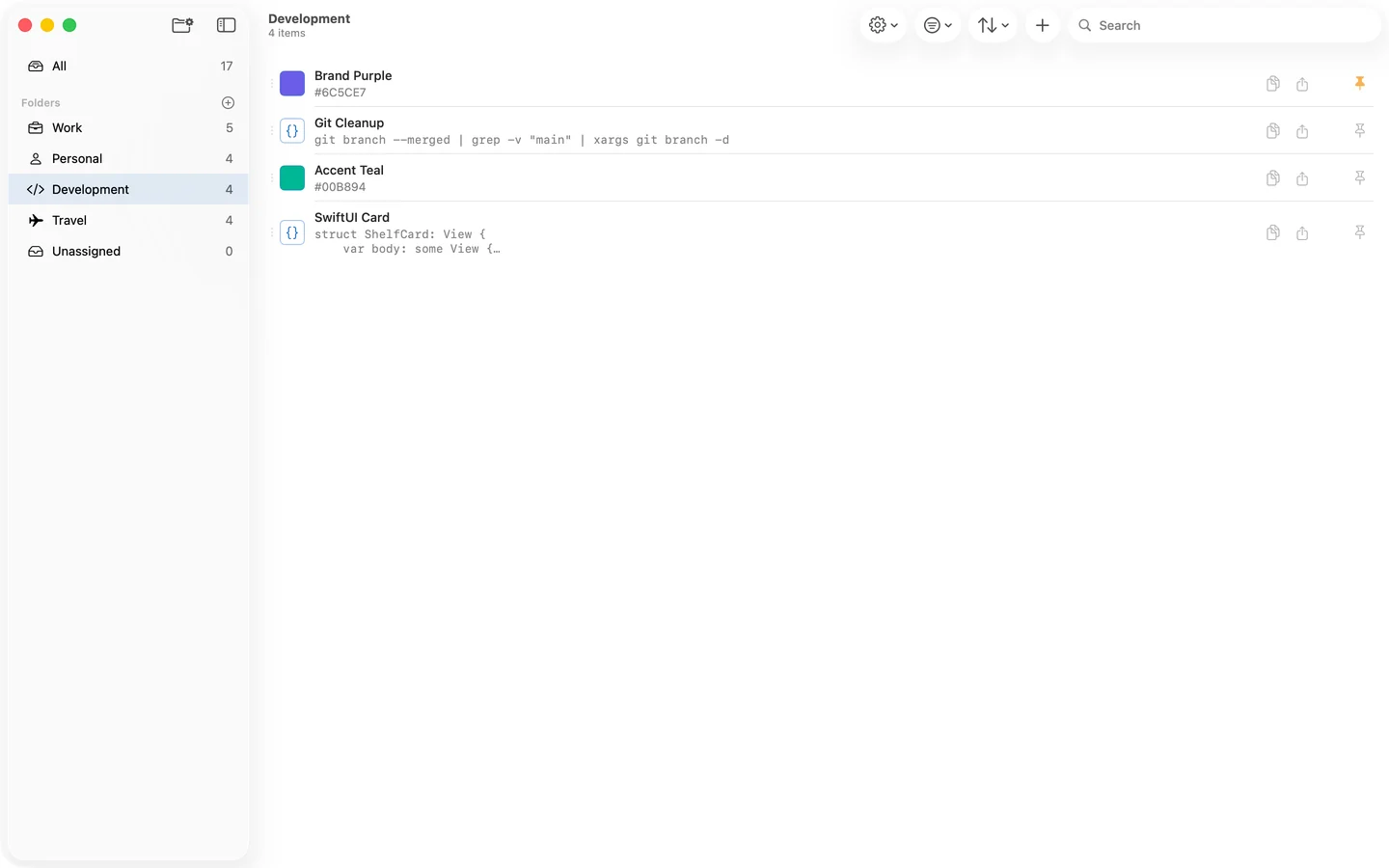
› Paste anything, and Shelf knows what it is: email, phone number, link, address, IBAN, date, colour, ID, prompt or code
› Tap the type icon to call the number, write the email, open the address in Maps, or open the link
› Code with syntax highlighting; hex, rgb and hsl values with a swatch of their colour
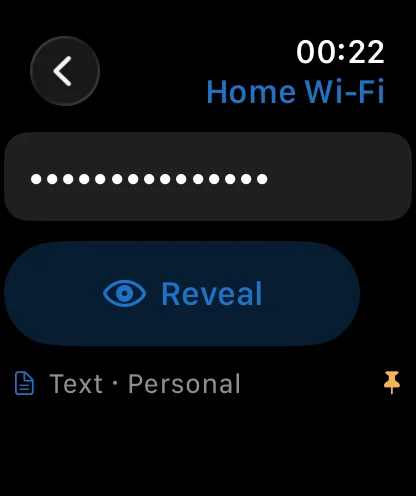
› Hidden values stay masked on screen until you peek, and clear themselves from the clipboard 60 seconds after a copy
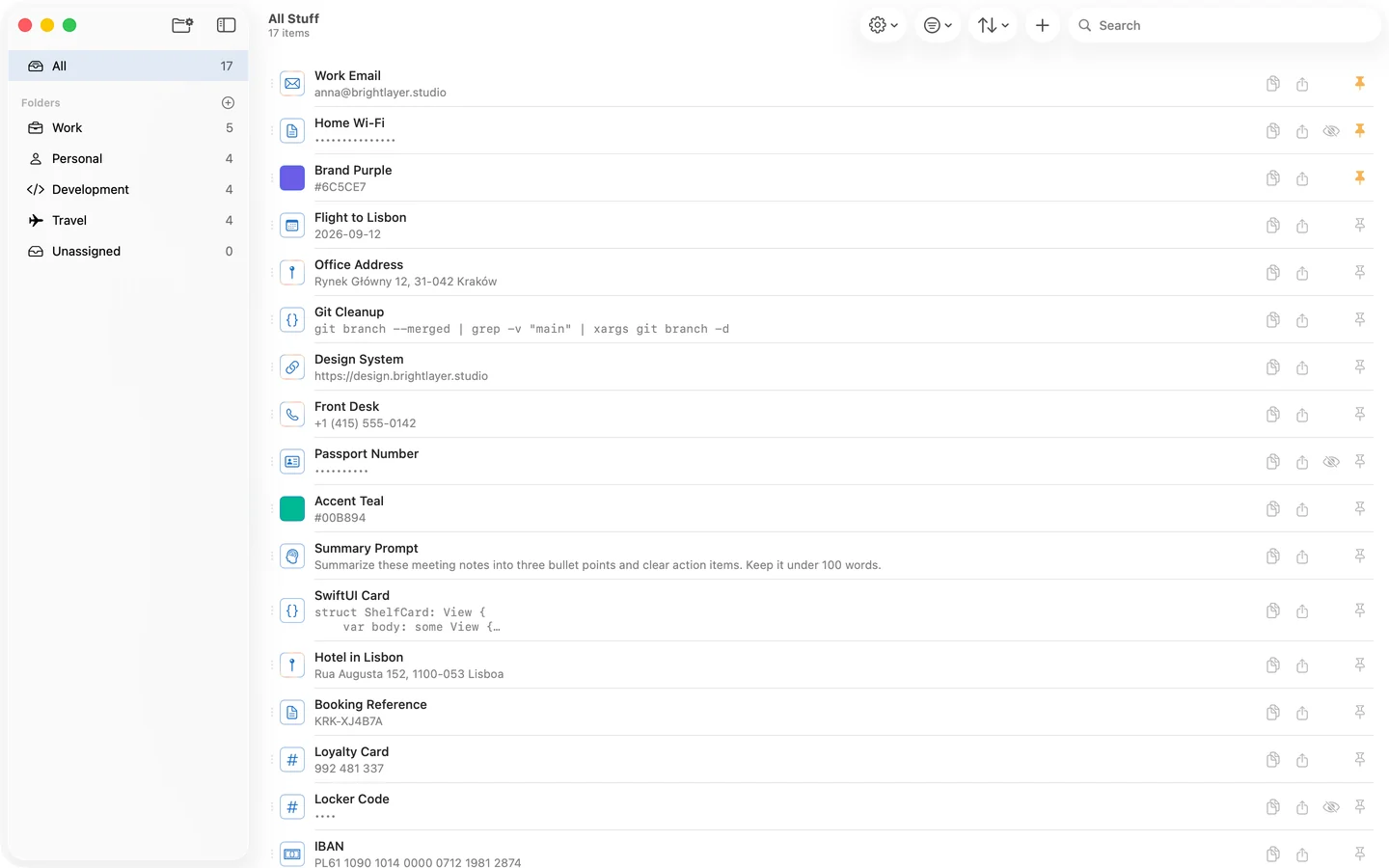
› Search as you type, across every folder
› Pin what you use most, or sort by most used, most recent, or your own order
› Folders with 460+ icons to choose from, each folder shown or hidden per device
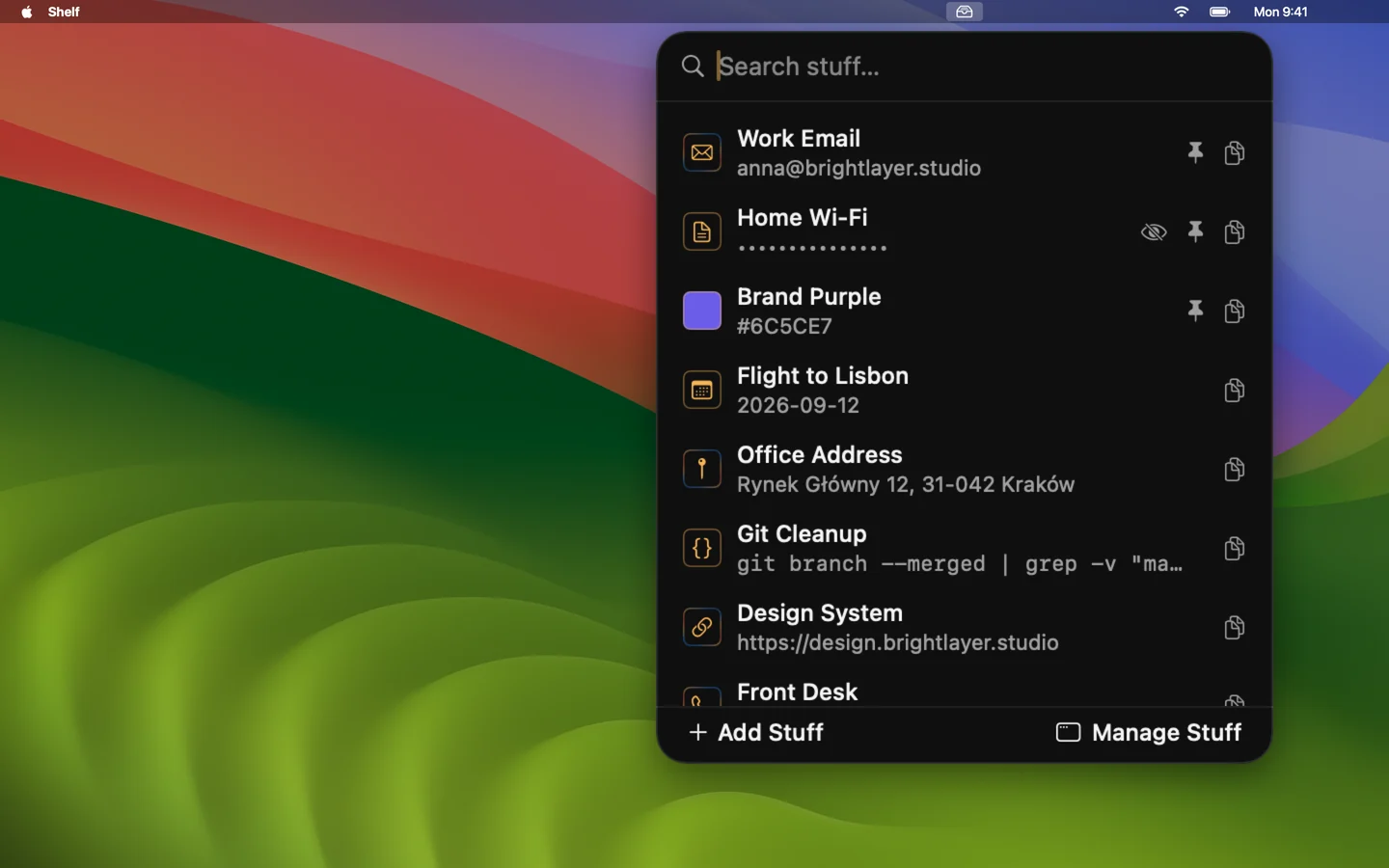
› Mac: a global shortcut opens a search box over whatever you are doing; Return copies, Escape takes you back
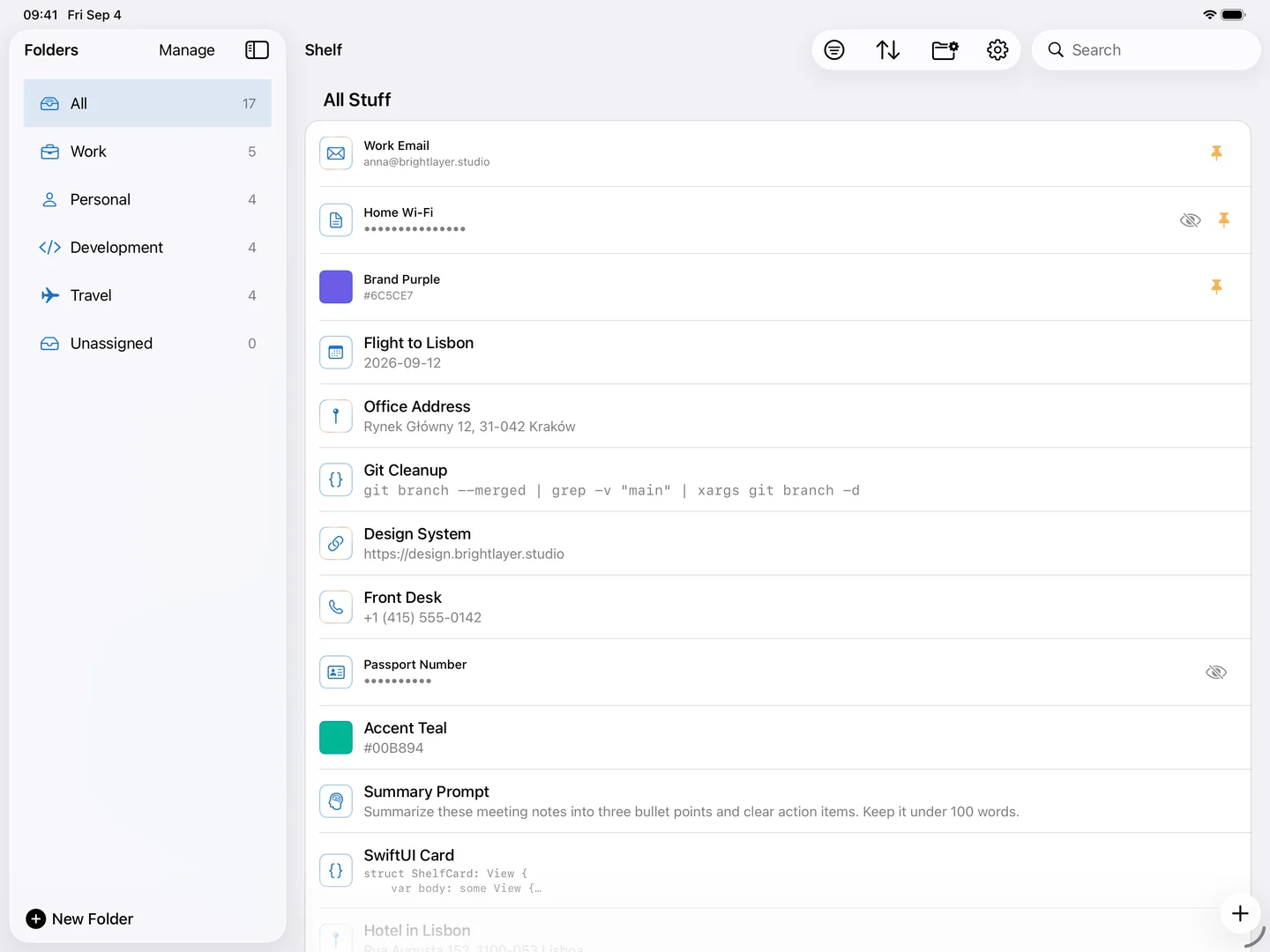
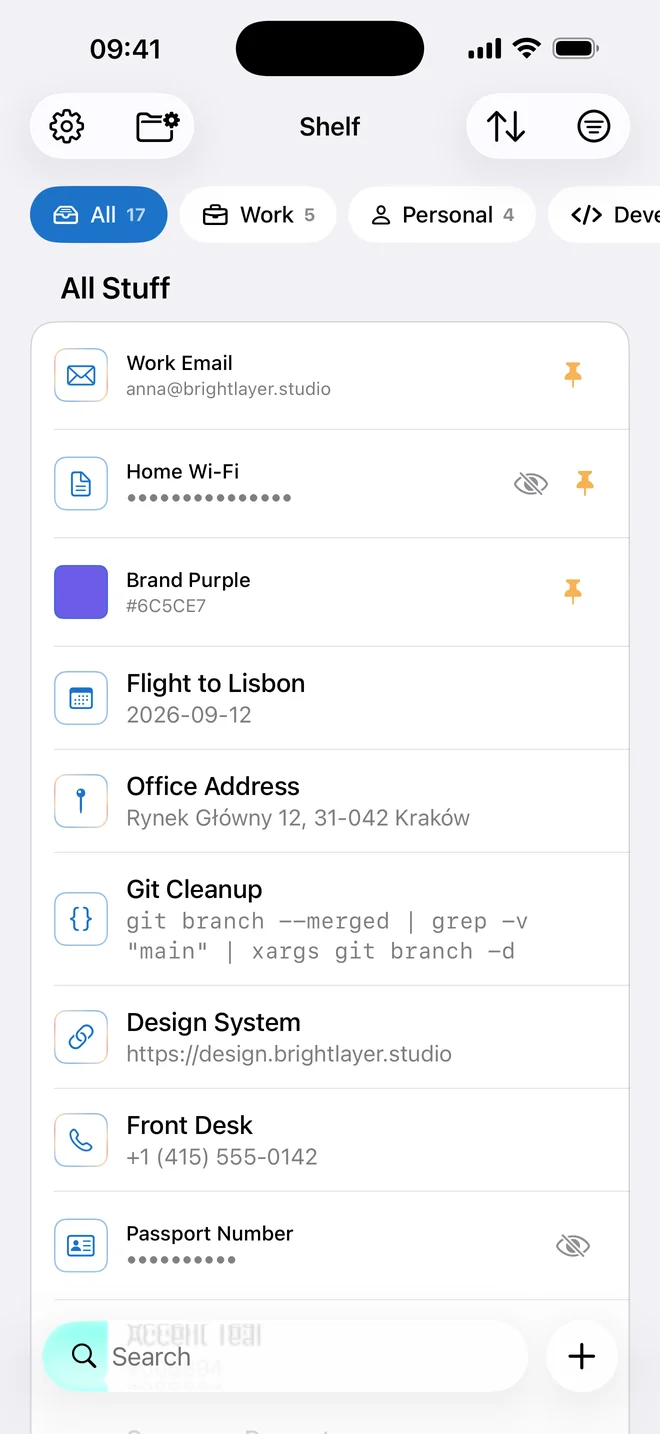
› iPhone and iPad: tap to copy, swipe to share or edit, long-press for more
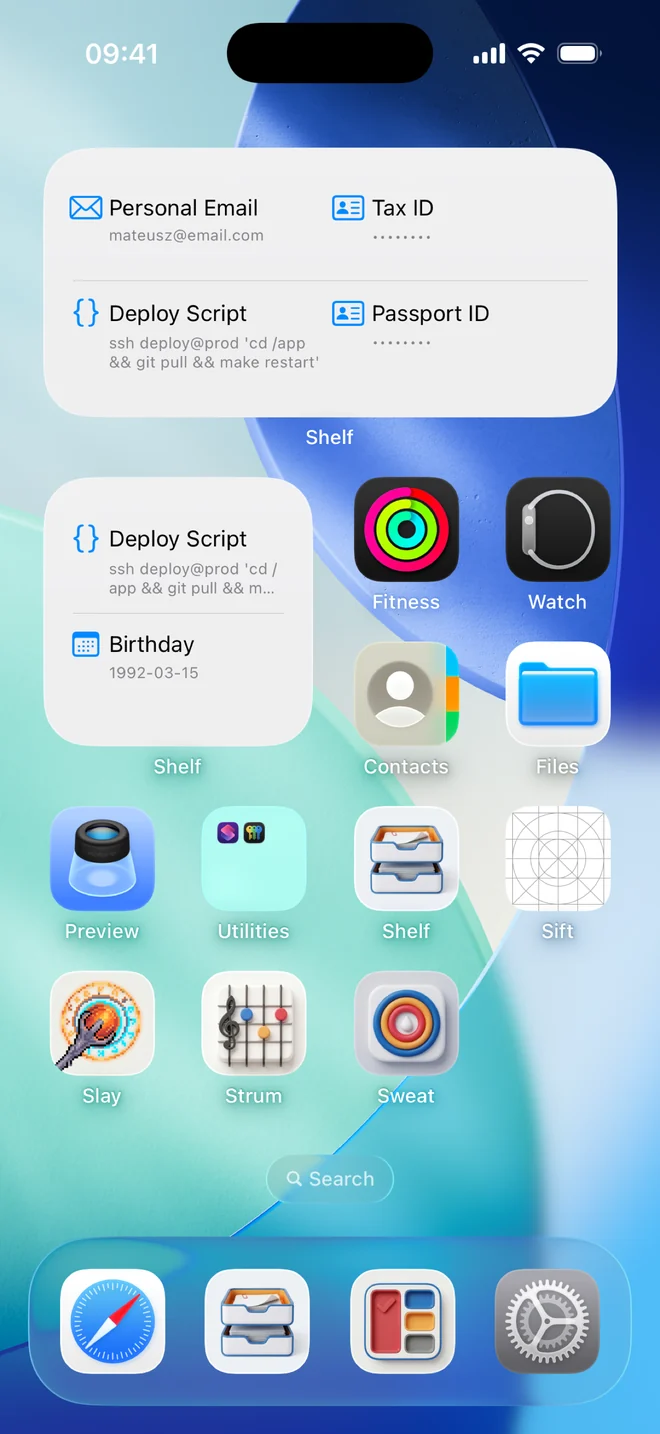
› Home Screen widgets that copy your stuff without opening the app
› Add from any app through the Share sheet
› App Lock with Face ID, Touch ID or your passcode
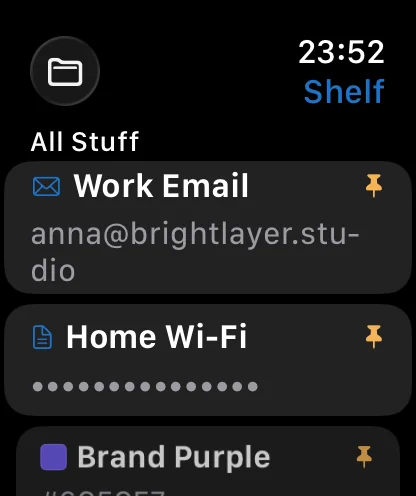
› Apple Watch: read your stuff from your wrist
› Encrypted on your device and synced through your own iCloud - no account to create, no server of mine
What's inside
Found in a Second
Search as you type, across every folder. Pin the stuff you use most, and sort by most used, most recent, or your own order. Folders come with 460+ icons to pick from, and each folder can be shown or hidden per device - keep Work off your personal iPhone.
Stuff, Understood
Paste a value, and Shelf works out what it is: email, phone number, link, address, IBAN, date, colour, ID, prompt or code. Smart Data Actions live on the type icon - tap it on a phone number to call, on an email to write, on an address to open Maps, on a link to open it. Code snippets get syntax highlighting, and hex, rgb and hsl values show their colour. Anything can be marked as a hidden value that stays masked on screen until you peek, and is cleared from the clipboard 60 seconds after you copy it.
On the Mac, in the Menu Bar
Shelf lives in the menu bar: a global shortcut (Control-Tab by default) opens a search box from inside any app - for instant pastes when and where you need it. Arrow keys to browse, Return to copy, Escape to dismiss - your hands never leave the keyboard. Hide it from the Dock and Shelf is there only when you call it; the full window stays a click away for organising, drag-and-drop ordering and CSV import and export.
On iPhone and iPad
Tap a row and its value is on your clipboard, with a haptic tick to say so. Swipe right to copy or share, swipe left to edit or delete, long-press for pin, hide, folders and the read-only view. Folders sit in a strip above the list on iPhone and in a sidebar on iPad. Anything you come across in another app goes in through the Share sheet, and the whole app can sit behind Face ID, Touch ID or your passcode.
On the Home Screen
Pick the stuff you reach for most and put it in a widget - small, medium or large - and one tap copies it without opening the app. Widgets are off until you switch them on in Settings, because they show your stuff outside the app and its lock; once on, hidden values stay masked in them, and on a locked iPhone the whole widget is redacted until you glance at it.
On Apple Watch
Browse and read your stuff from your wrist, filtered to the folders you choose - perfect for checking the door key code ;) The Watch app is a reader: watchOS has no clipboard for apps to write to, so copying stays on iPhone, iPad and Mac.
Encrypted Before It Leaves Your Hands
Labels and values are encrypted with AES-256-GCM on your device; only ciphertext is ever stored or synced. The key lives in your iCloud Keychain, end-to-end encrypted by Apple - never readable by Apple, and never by me. Sync runs through your private iCloud database. There is no Shelf server, no analytics, no telemetry, no crash reporting and no third-party code. Works fully offline; sync resumes when iCloud does.
Yours to Keep
Your stuff is yours, in a format you can leave with. Import a CSV to get started in one go, and export everything as CSV whenever you like, from Settings on any device. Delete something and it is gone from every device; delete the app and nothing of it stays behind on any server, because there is none. No account to create, and no subscription standing between you and your own data.
Support
Need help, found a bug, or want to suggest a feature? Email [email protected]. Include your device model and OS version - it makes most issues quicker to diagnose. I read every email.
Frequently asked questions
Where is my data stored?
On your device, and - if you are signed into iCloud - in your private iCloud database, synced by Apple's CloudKit. Nothing is stored on any server I control. See the privacy policy below.
How secure is my stuff?
The names and values of your stuff are encrypted on your device with AES-256-GCM before they are saved or synced. The key is kept in your iCloud Keychain, which Apple encrypts end to end, so only devices signed into your Apple Account can read your data. Folder names, icons and the type of each item are not separately encrypted, so folders can be navigated before anything is unlocked.
Does Shelf read my clipboard?
No. Shelf writes to the clipboard when you tap a row, and it looks at text only when you paste it into the add form to guess its type. It has no clipboard observer and never reads the clipboard in the background.
Can I use Shelf without iCloud?
Yes. Without an iCloud account Shelf keeps everything on the device and simply does not sync. Sign in later and syncing starts on its own.
Why isn't a folder I made on my Mac showing up on my iPhone?
Folders can be shown or hidden per device. Open the folder's settings and check that "Visible on iOS" is on. If it is, make sure both devices are signed into the same Apple Account, then check the sync status in Shelf's Settings.
Why are widgets off by default?
A widget shows your stuff on the Home Screen, outside the app and its lock. So they stay off until you turn them on in Settings › Security. Hidden values stay masked in widgets, and everything is redacted on a locked device.
Can I copy from my Apple Watch?
No - watchOS has no clipboard for apps to write to. The Watch app is for reading: browse your folders, search, and open a value to read it. Copying happens on iPhone, iPad and Mac.
Useful details to include:
- A short description of what happened.
- What you expected to happen.
- The Shelf build number (visible in Settings › About).
- Your device and its OS version.
- A screenshot, if relevant - with anything private cropped out.
Privacy Policy
Last updated: September 4, 2026
Shelf is built by Mateusz Dąbrowski. This policy explains what the Shelf app does with your data. It is short because there is not much to say: Shelf sends nothing to me, and what it keeps, it encrypts on your device first.
Nothing reaches me
I operate no servers for Shelf. There is no account to create, no sign-in, and no way for your data to reach me. Shelf contains no analytics, no telemetry, no crash reporting, no advertising identifiers and no third-party SDKs of any kind - it is built entirely against Apple's own frameworks. Its only network traffic is Apple's iCloud sync, described below.
What Shelf stores, and how
Everything you put into Shelf is saved on your device and, if you are signed into iCloud, in your private iCloud database through Apple's CloudKit. It is visible only to you, on devices signed into your Apple Account. I cannot see it.
- The names and values of your stuff are encrypted on your device with AES-256-GCM before they are saved or synced. Only ciphertext is ever stored, on the device or in iCloud.
- The encryption key is generated on your device and kept in your iCloud Keychain, which Apple encrypts end to end. It is never sent anywhere else, and it is not readable by Apple or by me.
- Folder names and icons, each item's type, whether it is hidden or pinned, how often you have used it, and your sort order are synced through iCloud with Apple's transport encryption but are not separately encrypted by Shelf. Folders need readable names to be navigated, and the type decides which action a row offers. These are visible to Apple as record metadata.
- Device-local settings - appearance, the global shortcut, App Lock, whether widgets are enabled, per-device folder visibility - stay on the device that set them.
Data Shelf does not collect
Shelf does not collect, transmit or store any of the following: personal information, account credentials, analytics or usage data, crash reports, advertising identifiers, location, contacts, photos, or your browsing. The App Privacy label on the App Store is "Data Not Collected", and this policy is why.
The clipboard
Copying to the clipboard is what Shelf is for: a value is written to the clipboard when you tap a row, and only then. Shelf reads text only from what you paste into its own add form, to guess the item's type; it has no clipboard observer and never reads the clipboard in the background. When you copy a value you marked hidden, Shelf tags it so clipboard managers skip it and clears it from the clipboard after 60 seconds.
App Lock
On iPhone and iPad you can require Face ID, Touch ID or your passcode to open Shelf. The check is performed by Apple's LocalAuthentication framework. Shelf receives only a yes or no; it never sees, stores or transmits biometric data.
Widgets and the Share sheet
Home Screen widgets are off by default. If you turn them on, the items you pick are decrypted on your device to be drawn on the Home Screen; hidden values stay masked, and on a locked device iOS redacts the widget entirely. The Share extension saves the text you share into Shelf and nothing else - it reads no other content from the app you shared from.
iCloud
Sync uses your own iCloud account and Apple's infrastructure; Apple's privacy policy governs it: apple.com/legal/privacy. Without an iCloud account, or if you sign out, Shelf keeps working with the data on the device and stops syncing. You can turn iCloud off for Shelf alone in your device's iCloud settings.
Deleting your data
Delete an item or a folder in Shelf and it is removed from the device and from your iCloud database on every synced device. Deleting the app removes its local data; what is in iCloud can be removed under Settings › Apple Account › iCloud › Manage Storage › Shelf. The encryption key in your iCloud Keychain can be removed from Shelf's Settings › Security, which makes any remaining ciphertext permanently unreadable.
Children's privacy
Shelf is not directed at children and collects no information from anyone, of any age.
Changes to this policy
If the policy changes, I'll update the "Last updated" date above and post the new version at the same URL. Material changes will be called out in the app's release notes.
Contact
Questions about this policy or about Shelf's data handling: [email protected].