Strum
Write. Tune. Play.
A clean, focused tablature editor for ukulele and guitar. Write tabs, play them back to check your timing, tune your instrument, and practice with a metronome that auto-scrolls the tab and ramps the tempo to build muscle memory.

One purchase. No subscription, ever.
iPhone · iPad · Mac (Apple Silicon)
Requires iOS / iPadOS / macOS 26 or later
Why Strum
Write Everything in One Place
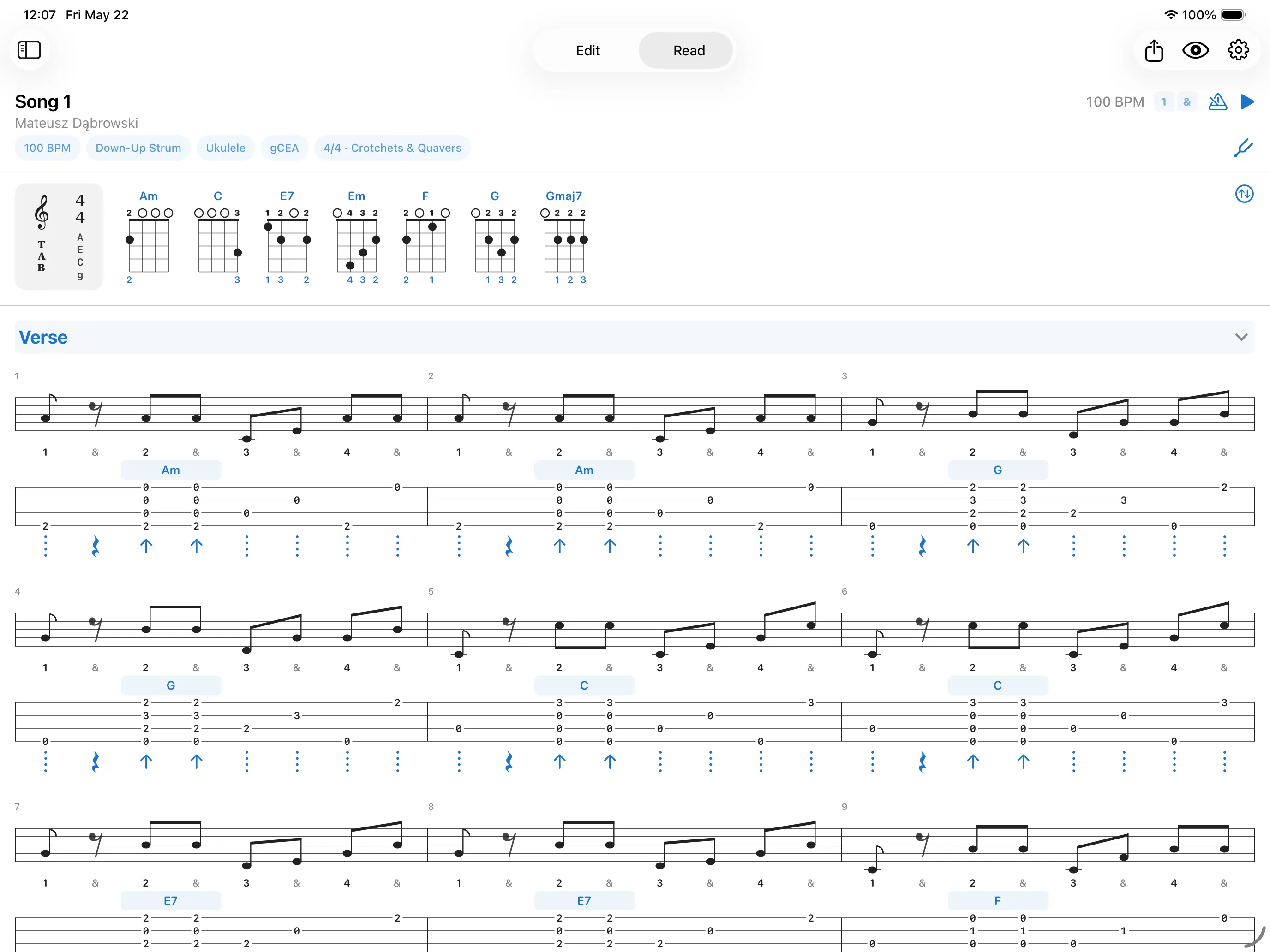
Combine staff, tabs, chords, and lyrics on a single screen. Set up song sections and duplicate measures to build arrangements fast.
Hear It,
Hands-Free
Hear your song played back on a real recorded instrument. With a built-in metronome, subdivision control, and follow-tab auto-scrolling, your hands never leave the instrument. The Practice Hub adds tempo speed-ups, drop-out training, and count-ins to build muscle memory.
Build Your Own Chords and Patterns
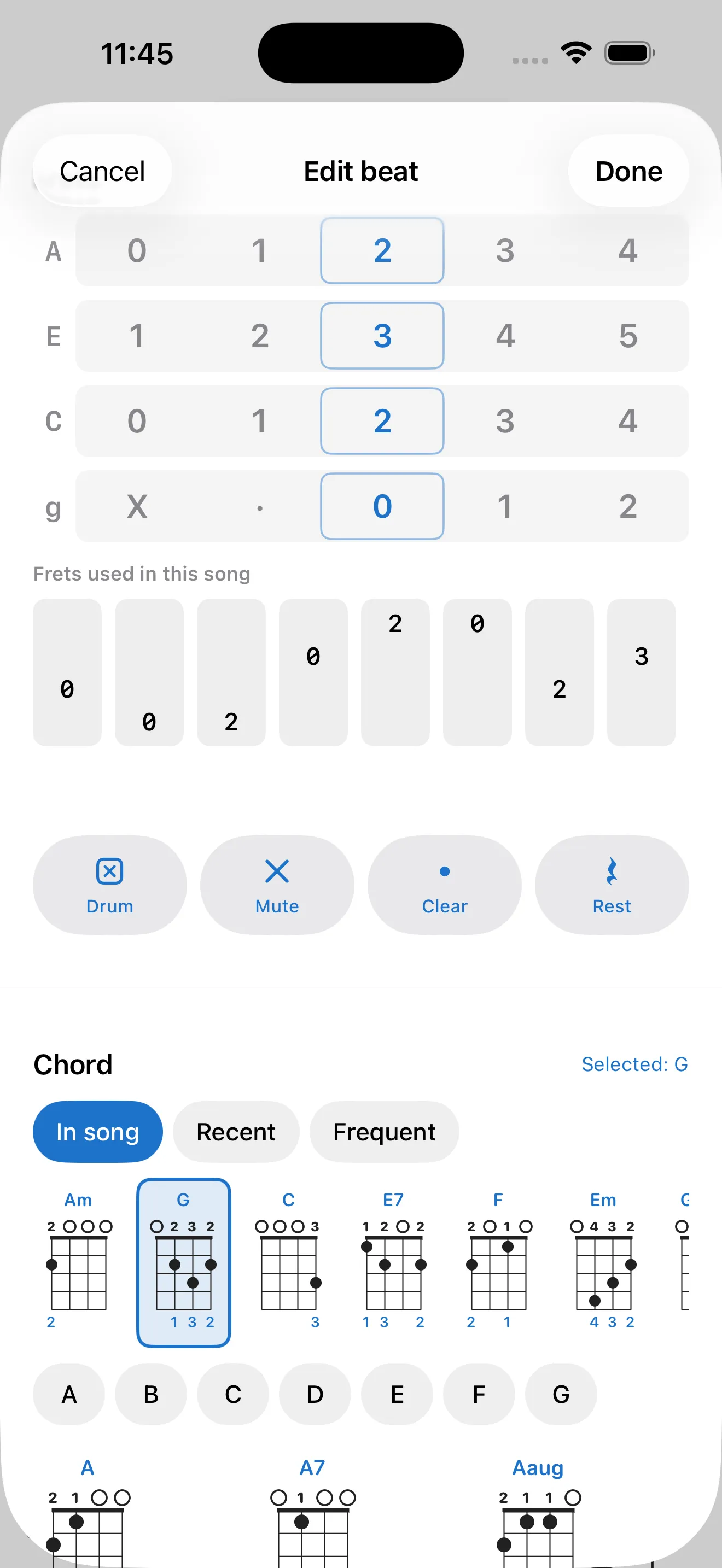
Build exact finger placements with the multi-fret chord editor, and design your own strum patterns from strokes, mutes, and rests. Browse and tweak every chord shape from the global library - no song required.
What's inside
Tab-first Editing
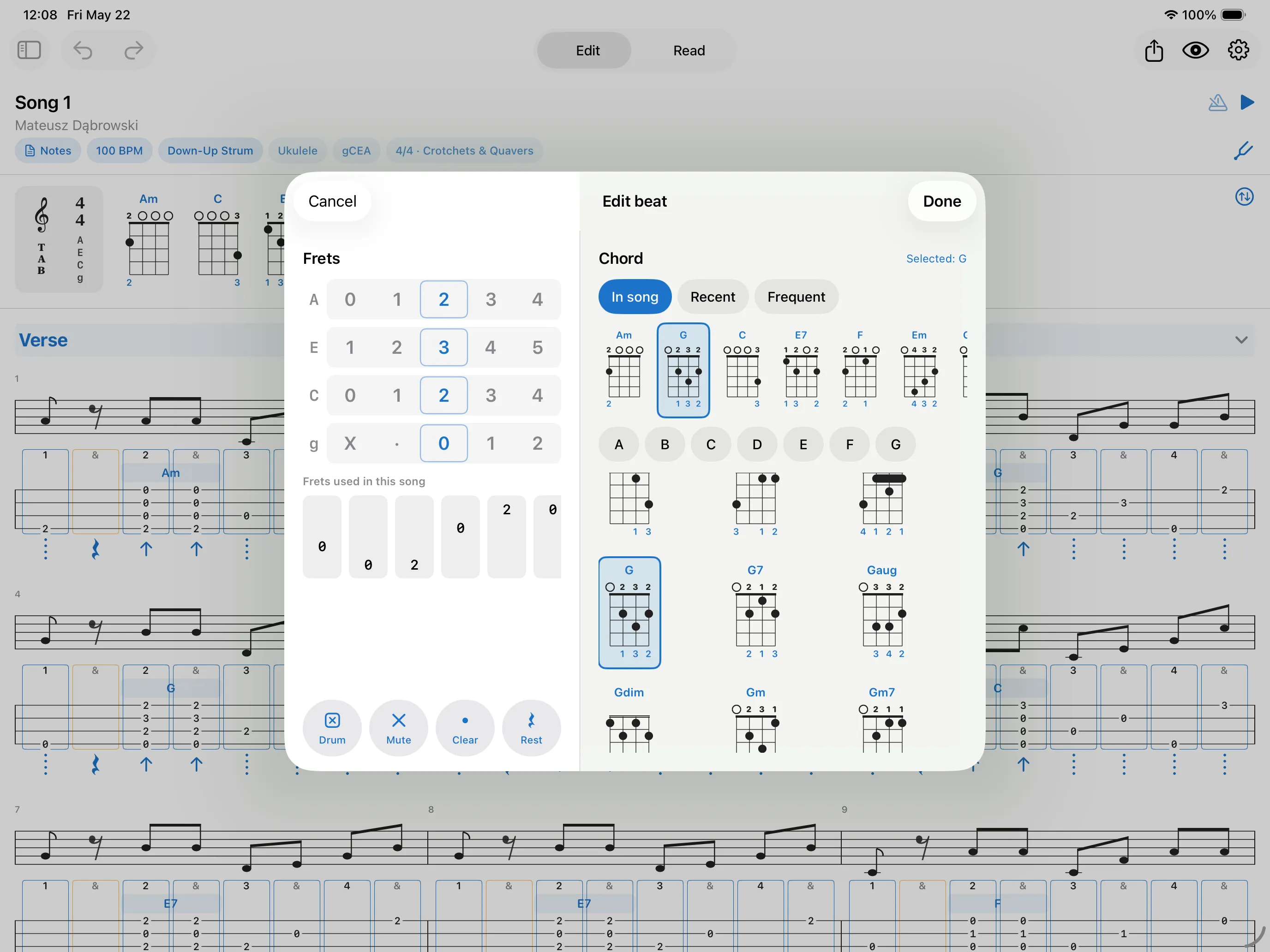
Tap any beat to open a focused editor. Dial in notes on per-string fret wheels, pick a chord from a filterable grid, or drop a rest, mute, chuck, or drum hit. Long-press any chord to customize its shape or fingering. Arrange longer pieces by configuring custom song sections, adding repeat barlines, and duplicating entire measures or sections. Set a capo and playback moves to the sounding pitch while the tab keeps the frets you actually hold. Supports ukulele (high-G, low-G, baritone), guitar and electric guitar (Standard, Eb half-step-down, Drop C, Drop D), and any custom tuning you build.
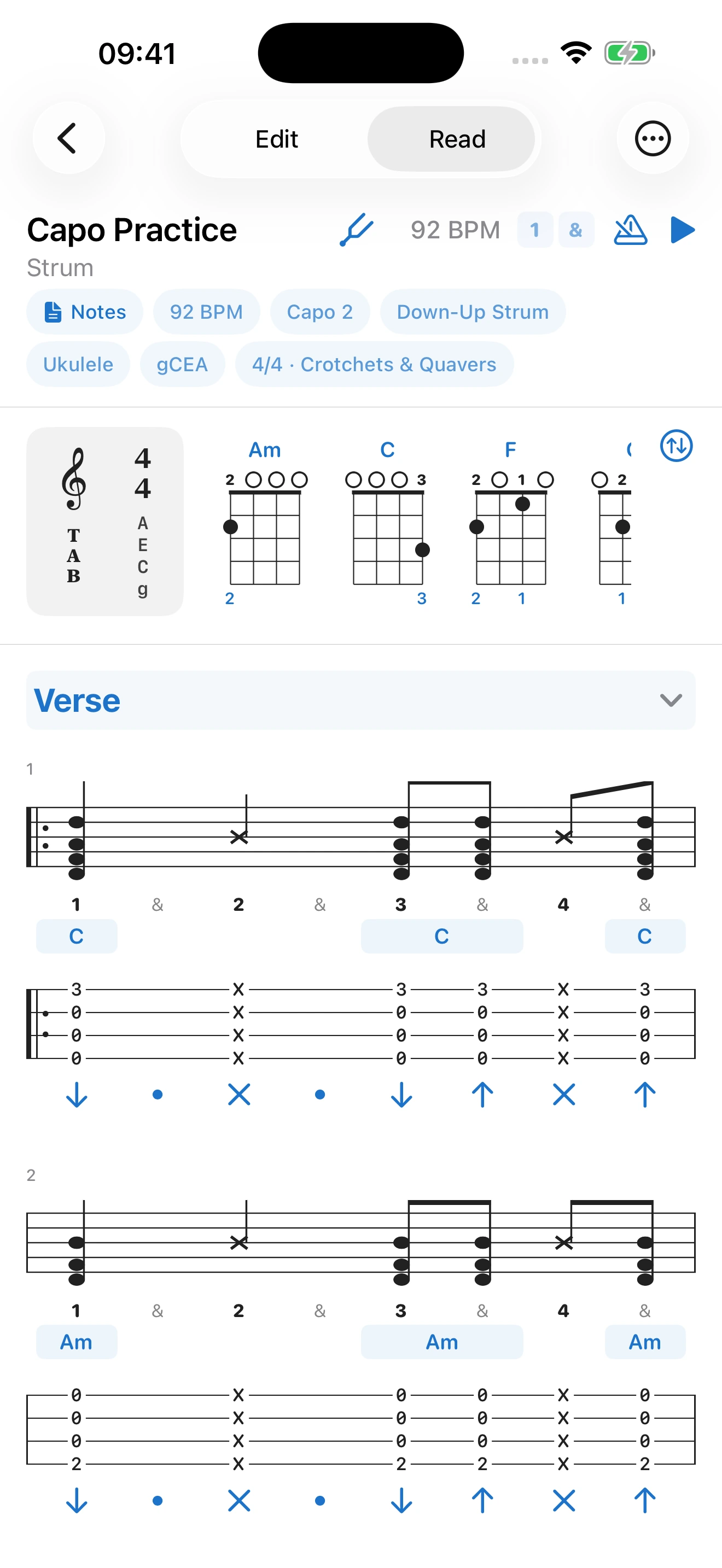
Capo, the Songbook Way
Set a capo on any song and playback moves to the real sounding pitch, while the tab keeps showing the frets you actually hold. Chord names stay the ones you know - a C shape is still "C" - with a "Capo 2" badge on the song and on exported PDFs, exactly how a songbook prints it. Standard notation follows the capo too, because notation shows what you hear. The tuner knows about it as well: tune the open strings as usual, then switch to the capoed pitches to check your intonation with the capo on.
Built-in Tuner
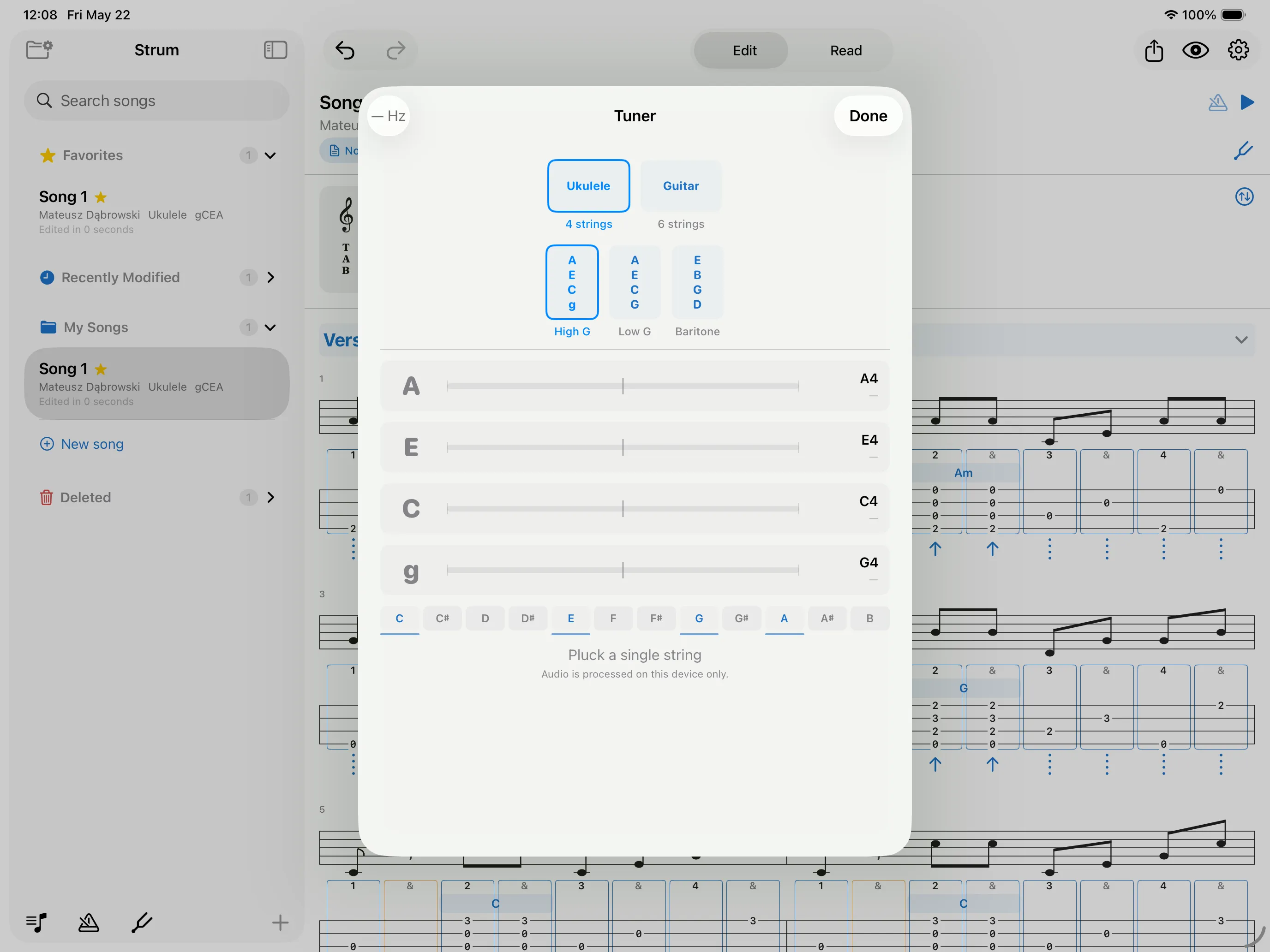
Pluck a string, see flat/sharp/in-tune feedback in real time. An adaptive noise gate ignores room sound so the needle stays steady, and the tuner snaps straight to the correct string when you switch notes. Tunes to any tuning you use, including your own custom ones. The custom tuning editor carries its own detector as well: pluck a string and tap Set to capture the pitch you are hearing. Set the concert pitch anywhere from 415 Hz to 466 Hz to match whoever you are playing with, or switch to capoed targets to check intonation with the capo on. Audio is processed entirely on-device and never recorded or transmitted. Reach it any time from the library - tune up before you even open a song.
Chord & Strum Libraries
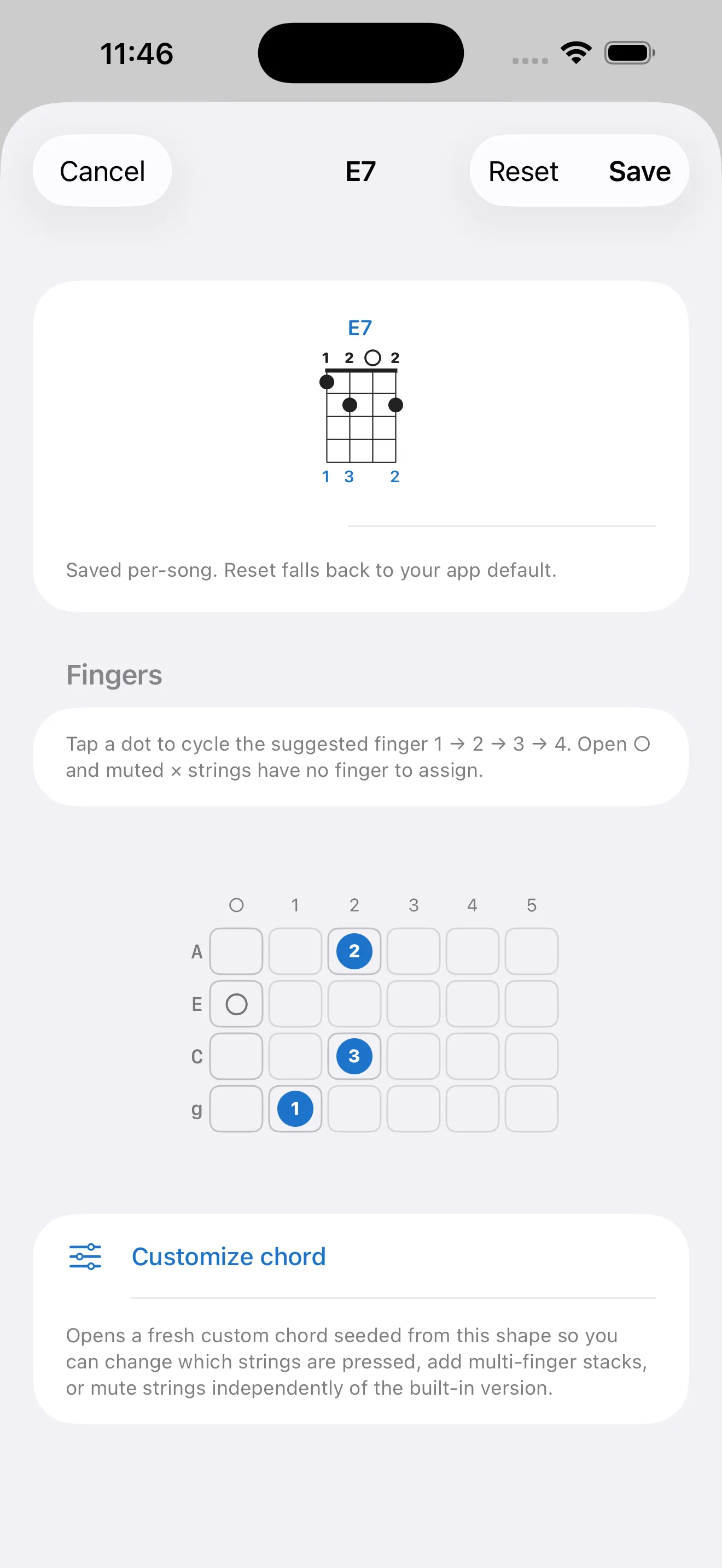
Use the standard shapes, or place every finger yourself in the multi-fret finger editor. Design your own strum patterns from strokes, chucks, mutes, and rests. Save any custom shape or strum pattern to your global library to reuse it everywhere, or keep it specific to just one song. Browse and filter every chord in your tuning straight from the library.
Recorded Instruments
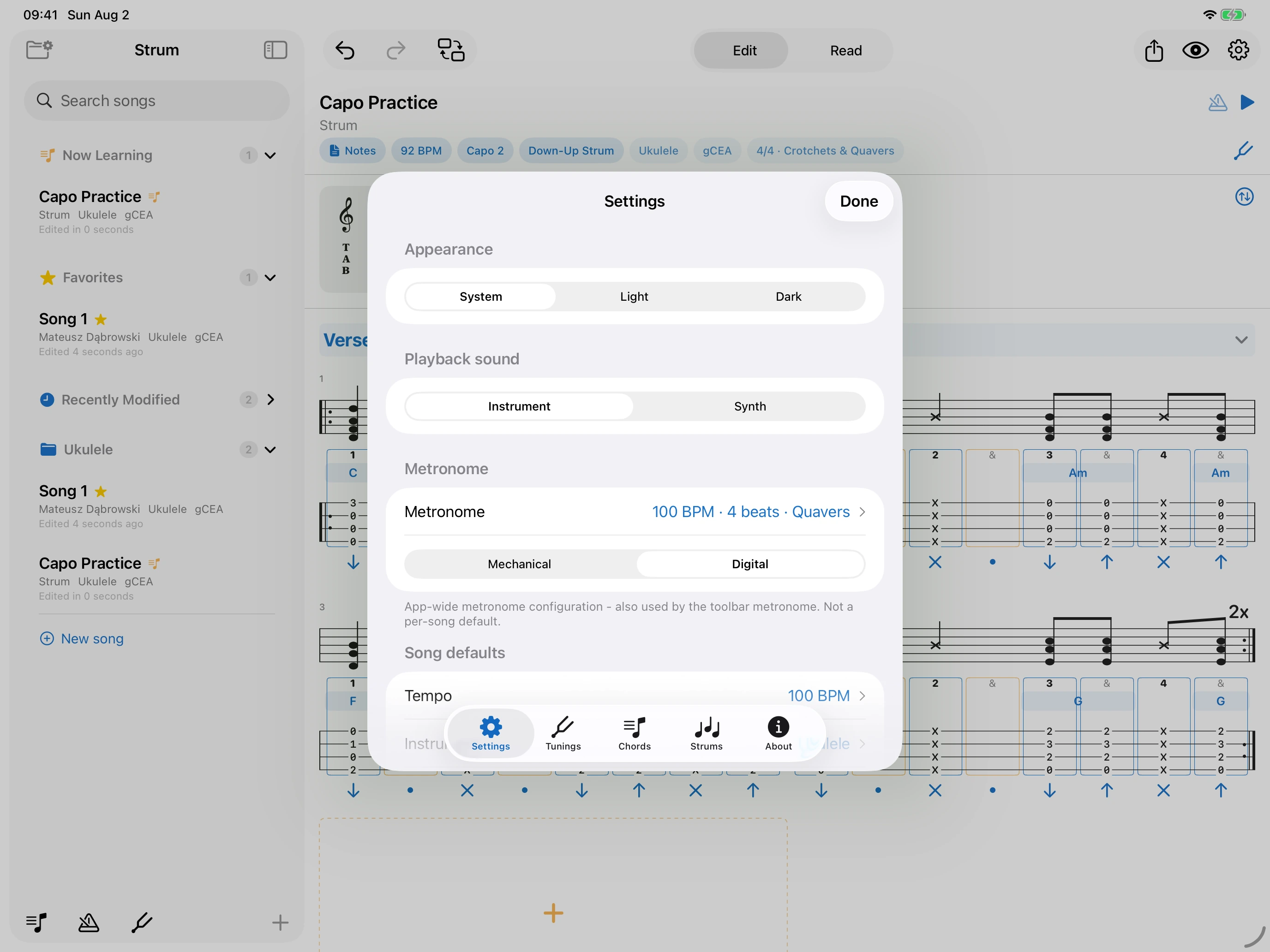
The ukulele you hear was recorded for this app, so chords ring and fade the way the real thing does - percussive body taps and muted chucks included. Guitar and electric guitar play sampled recordings of real instruments too. Prefer something lighter? One switch in Settings moves everything to the built-in synth, set per device so your iPhone and iPad can differ. The metronome has the same choice: a recorded mechanical click, or a clean digital one.
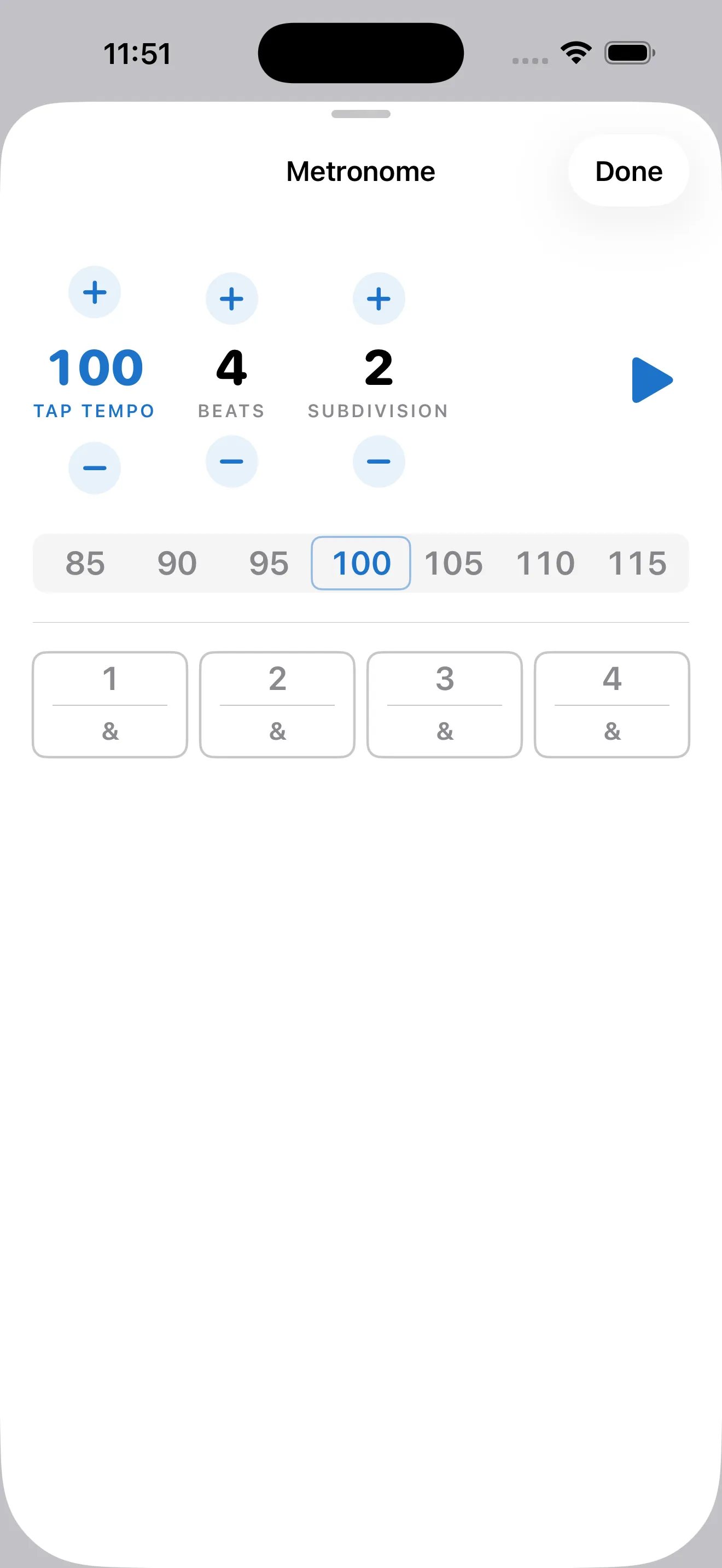
Playback & Metronome
Tempo wheel for live BPM changes and subdivision control. The follow-tab automatically scrolls the song along with the metronome while you play. Playback respects your repeats and section markers. The metronome also lives in the library for a quick standalone click.
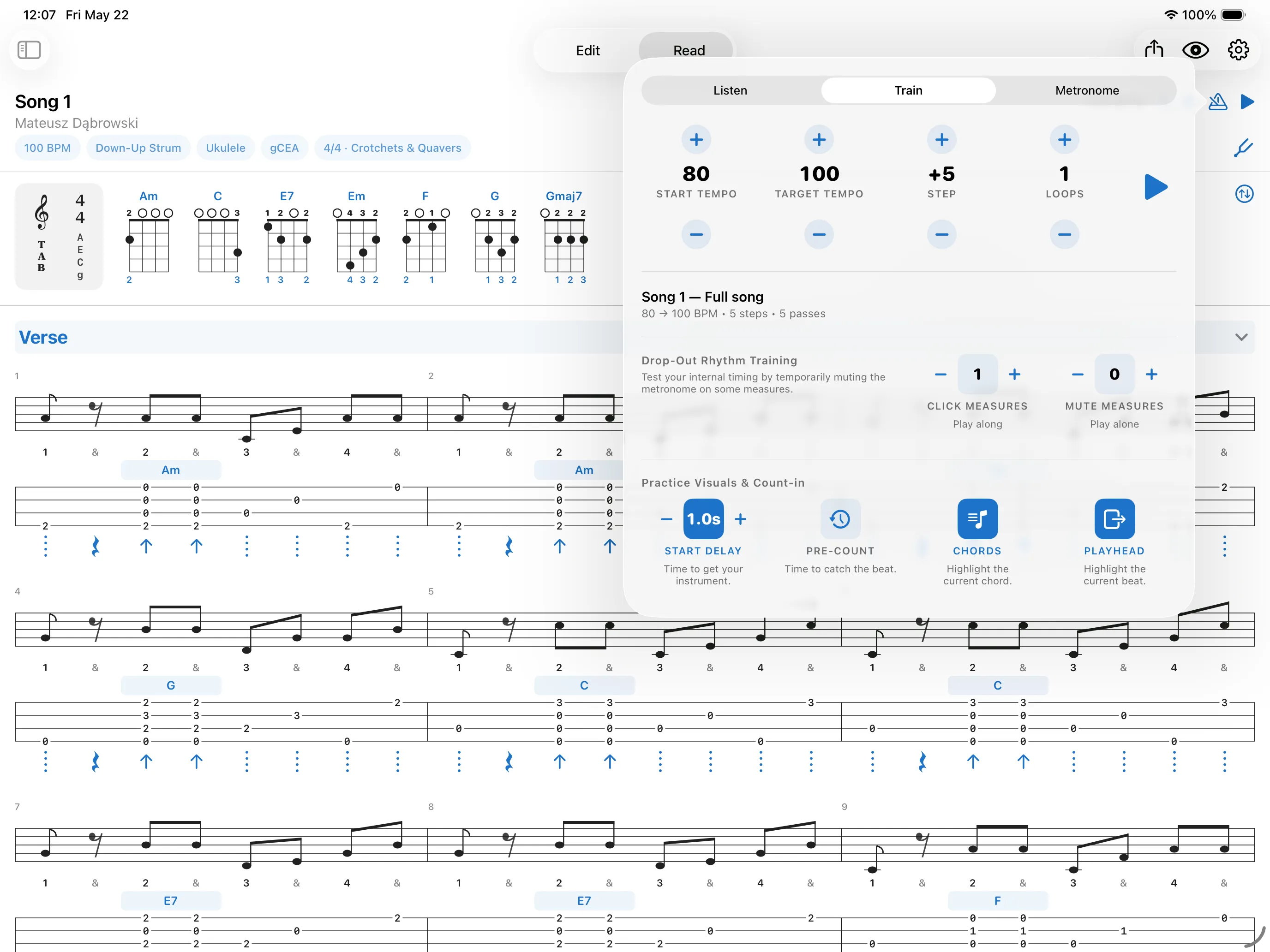
Practice & Training Lab
Open the Practice Hub in Read mode from the metronome icon or by long-pressing any measure or section. Loop a passage while the Rhythm Training Lab ramps the tempo up step by step to build muscle memory at speed. Drop-out training mutes the click for a few measures at a time so you learn to hold time on your own, and count-ins give you a beat to catch before playback begins. Scope any of it to a single measure, a section, or the whole song.
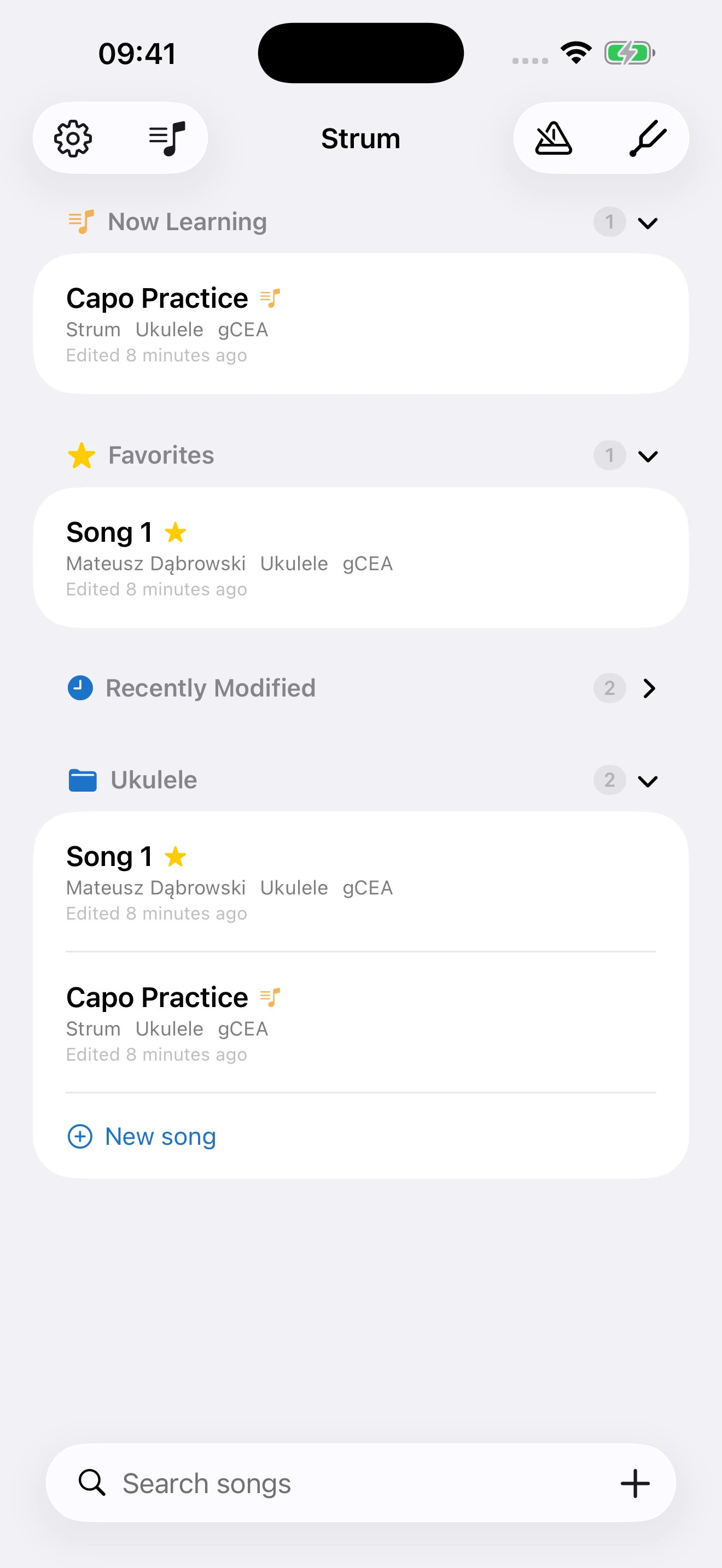
A Library That Stays Tidy
Group songs into colour-coded folders, star the ones you come back to, and mark the one you are learning right now - it gets its own section at the top. Search by title or artist, sort how you like, and reorder by dragging. Deleted songs rest in a Trash for 7 days, so a mis-tap is easy to undo.
Private iCloud Sync
Songs, folders, and preferences sync automatically through your private CloudKit database. No accounts. No analytics. No third-party servers.
Export & Share
Export any song as a clean vector PDF or image to print and share. You can also send the native .strum file directly to another Strum user, who can open it and keep editing.
The .strum format is documented in full, written to be handed straight to an AI assistant. Give it the spec and the song you want, and it can write an importable file for you.
Support
Need help, found a bug, or want to suggest a feature? Email [email protected]. Include your device model and OS version - it makes most issues quicker to diagnose. I read every email.
Frequently asked questions
Where are my songs stored?
On your device, and synced to your private iCloud account. Nothing is stored on a server I control. See the privacy policy below for details.
A song I made on iPad isn't showing up on iPhone.
Both devices need to be signed into the same iCloud account, with iCloud Drive on. Open Strum's Settings → About tab - if it says "Local-only fallback", iCloud isn't reachable; sign into iCloud in the system Settings app and re-launch Strum. Sync usually catches up within 30 seconds.
I deleted a song by accident.
Songs go to Trash for 7 days before they're permanently removed. Open the Trash section in the sidebar, swipe the song, and tap Restore.
The tuner says my strings are wildly out of tune.
Make sure you've selected the right tuning in Song header → Tuning (high-G, low-G, or guitar standard). The tuner expects the notes for the active tuning.
Can I print or share a song as PDF?
Yes - open the song, tap the share icon, and choose to export as a PDF, an Image, or a native .strum file (perfect for sending to other Strum users). When exporting a PDF or Image, the output matches exactly what you see on screen - toggle off the staff or lyrics in the app and they are gone from the export too. To export many songs at once, use Settings → Export library.
Can I get a song in without typing it out?
Two ways. Any .strum file someone sends you imports directly. And the format is documented in a single file written for AI assistants - hand that document to Claude, Gemini or ChatGPT along with the song you want, and ask it for a .strum file. Everything imported is validated and clamped on the way in, so a malformed file can't corrupt your library.
Does Strum support [feature X]?
Everything Strum does today is listed above. If the feature you need isn't there, write in - I read every email and feature requests inform what ships next.
Useful details to include:
- A short description of what happened.
- What you expected to happen.
- The Strum build number (visible in Settings → About).
- Your device and OS version.
- A screenshot, if relevant.
- For song-specific bugs: the exported
.strumfile (Editor → ⋯ → Export Song).
Privacy Policy
Last updated: May 4, 2026
Strum is built by Mateusz Dąbrowski. This policy explains what data the Strum app handles and how. It is short because Strum collects very little.
Data Strum stores
When you create a song, folder, chord shape, strum pattern, or preference inside Strum, that data is saved to your device and synced to your private iCloud account through Apple's CloudKit service. Specifically:
- Songs and their sections, measures, beats, tab notes, and lyrics.
- Folders and the songs contained in them.
- Custom chord shapes you create.
- Custom strum patterns you create.
- App preferences (default tempo, tuning, time signature, default fingerings, metronome settings, follow-tab options).
This data never reaches a server controlled by me. It is stored in your iCloud private database and is visible only to you, on devices signed into the same Apple ID. I - the developer - cannot see it.
Data Strum does not collect
Strum does not collect, transmit, or store any of the following:
- Personal information (name, address, phone, email).
- Account credentials.
- Analytics, telemetry, crash reports, or usage data.
- Advertising identifiers.
- Location data.
- Contacts, photos, calendars, or other system data.
There are no third-party SDKs in the app. The only network traffic Strum makes is to Apple's CloudKit, syncing your library into your own iCloud account.
Microphone
Strum requests microphone permission only when you open the in-app tuner. The tuner listens to a string you pluck and tells you whether it's in tune. Audio is processed entirely on-device, in real time, and is never recorded, saved, or transmitted. If you deny microphone permission, every other part of Strum continues to work normally - only the tuner is affected.
iCloud
Strum's sync uses your iCloud account. Apple's privacy policy governs how iCloud handles your data: apple.com/legal/privacy. If you sign out of iCloud, or disable iCloud for Strum in Settings, the app continues to work - your library is stored locally on the device. New changes simply stop syncing to other devices.
Children's privacy
Strum is rated 4+ and is suitable for all ages. Because Strum does not collect any personal information, it complies with COPPA and similar laws by design.
Deleting your data
Songs you delete in Strum go to a Trash folder for 7 days, then are permanently removed from your iCloud private database. You can also empty the Trash manually from the sidebar.
To remove all Strum data from iCloud at once: delete the app from each of your devices, then go to Settings → [Your Name] → iCloud → Manage Account Storage → Strum on iOS, or System Settings → Apple Account → iCloud → Manage → Strum on macOS, and tap Delete Data.
Changes to this policy
If the policy changes, I'll update the "Last updated" date above and post the new version at the same URL. Material changes will be called out in the app's release notes.
Contact
Questions about this policy or about Strum's data handling: [email protected].