Your tools, under your control
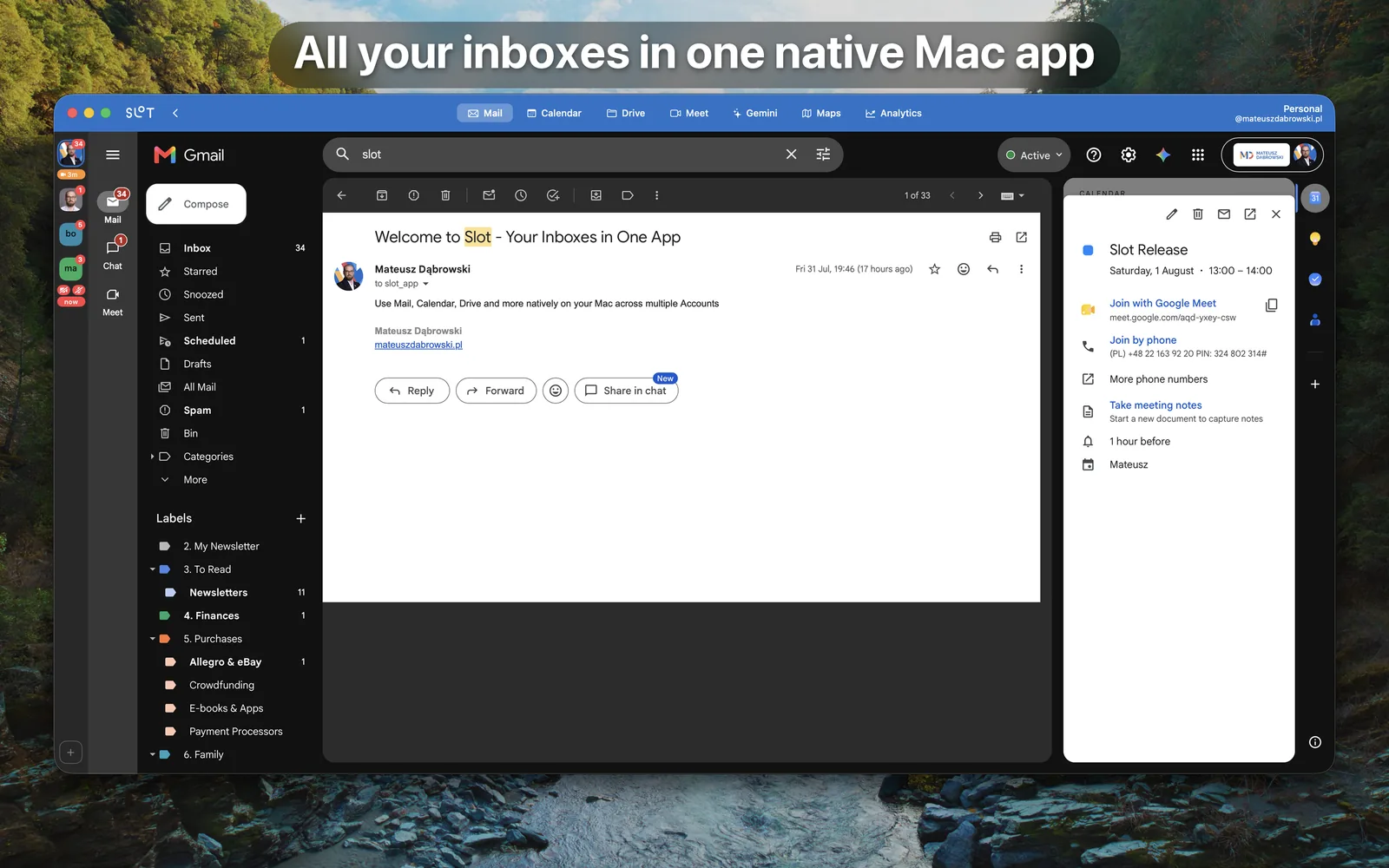
All your inboxes - and the rest of Google's and Microsoft's productivity apps - in one native Mac window, with everything a browser tab can never give you: unread on the Dock, notifications with per-account quiet hours, meeting countdowns, your call's mute one click away, and links that always open as the right account. All of them signed in at once, each in its own sealed session. No signing out, no private windows, no hunting through tabs.

One purchase. No subscription, ever.
Mac
Requires macOS 26 or later
Why Slot
Everything Gmail and Outlook already give you - and:
› Unread counts on the Dock and on every account tile
› A New badge for what arrived since you last looked
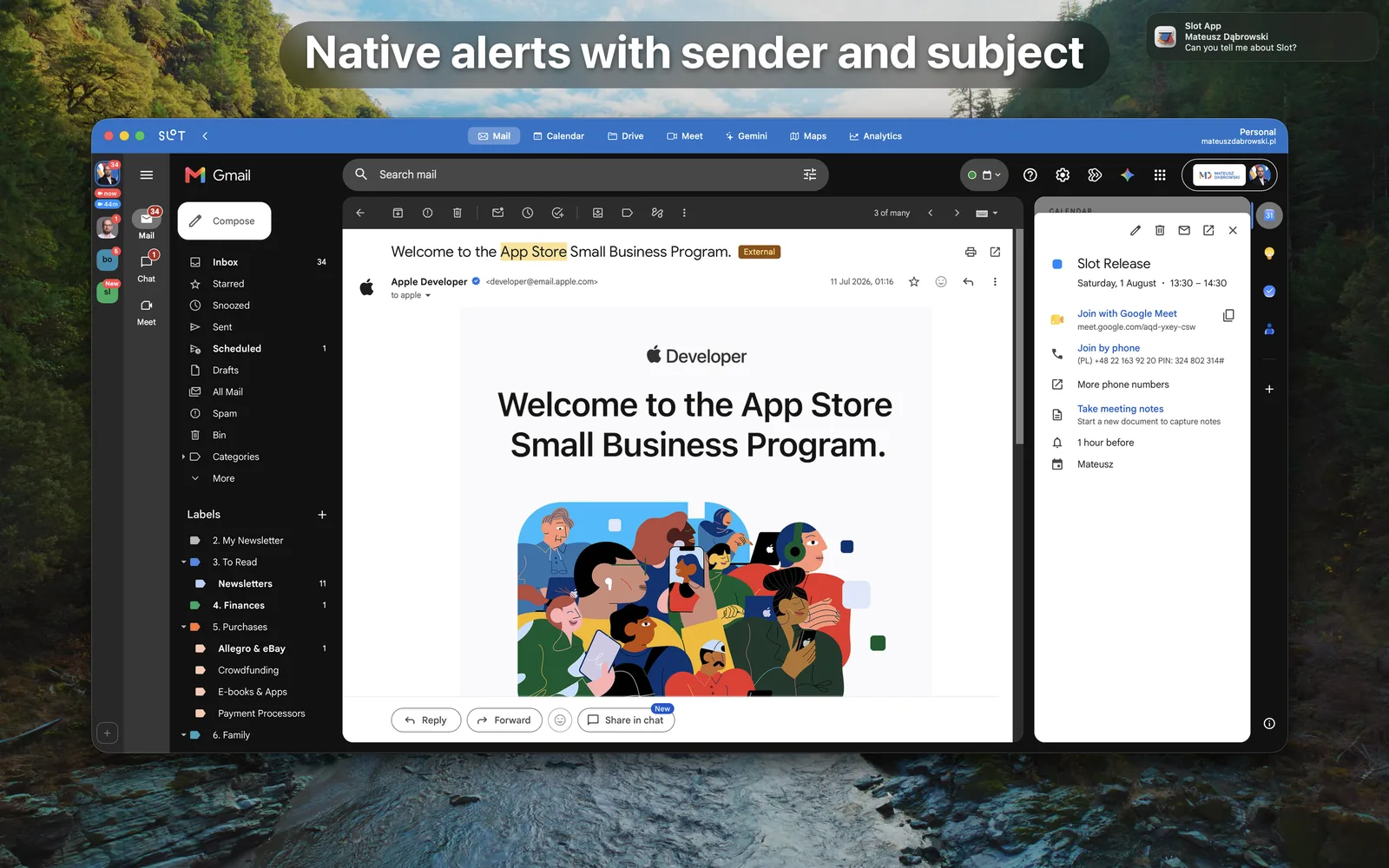
› Native notifications that name the sender and subject
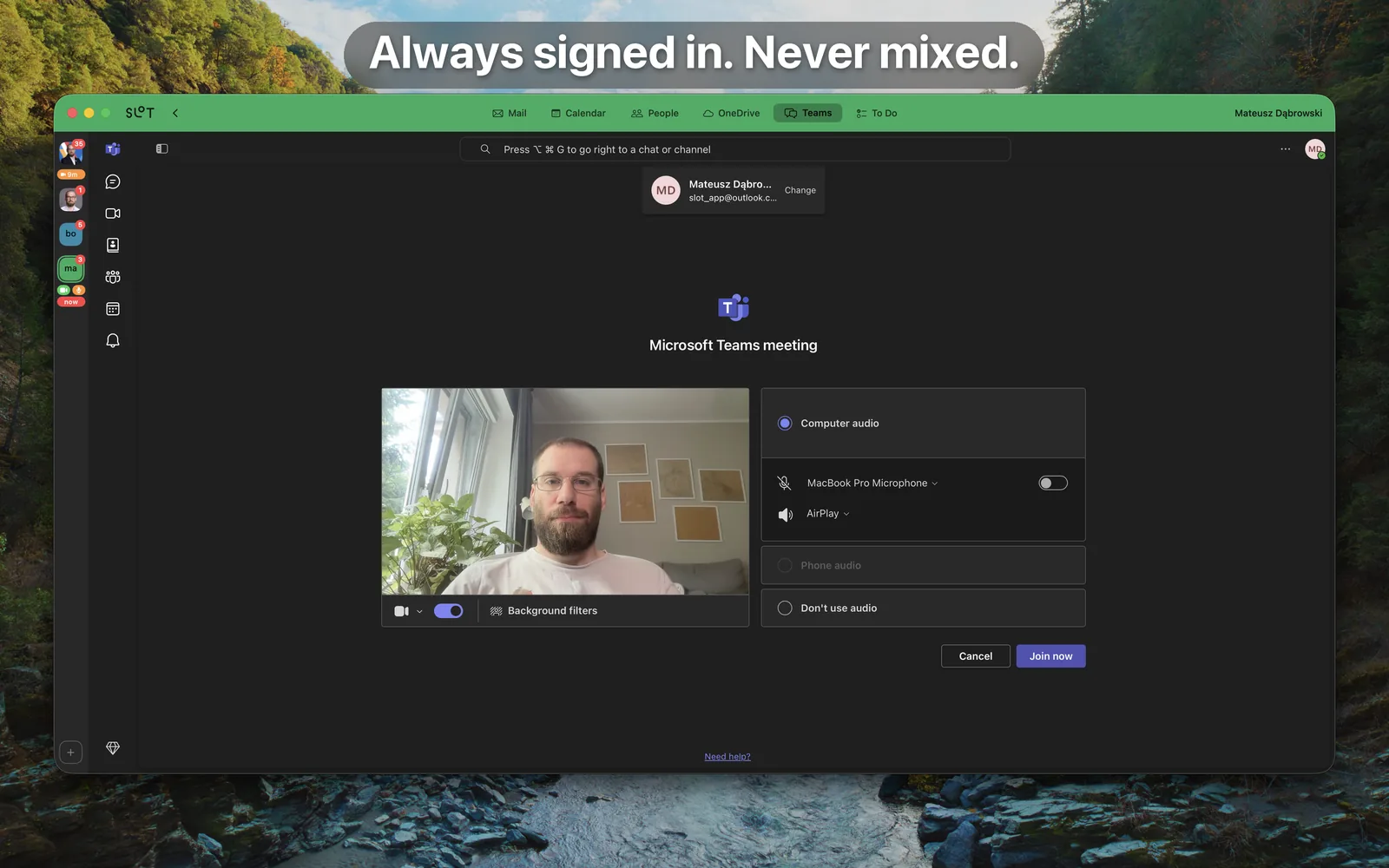
› Quiet hours and alert pauses, per account
› Meeting countdowns under each account's tile
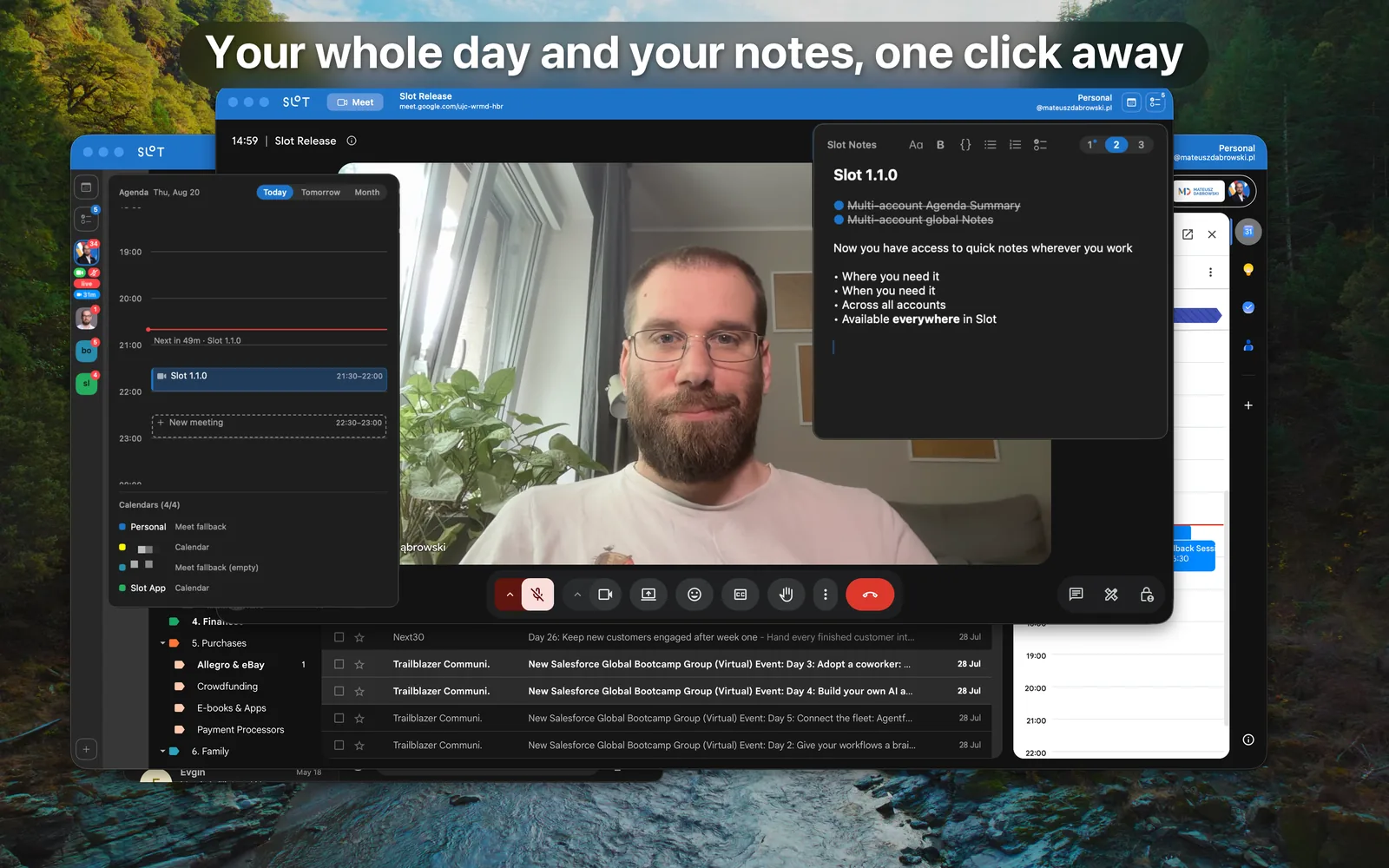
› An agenda of every account's day on one timeline - today, tomorrow, or a month
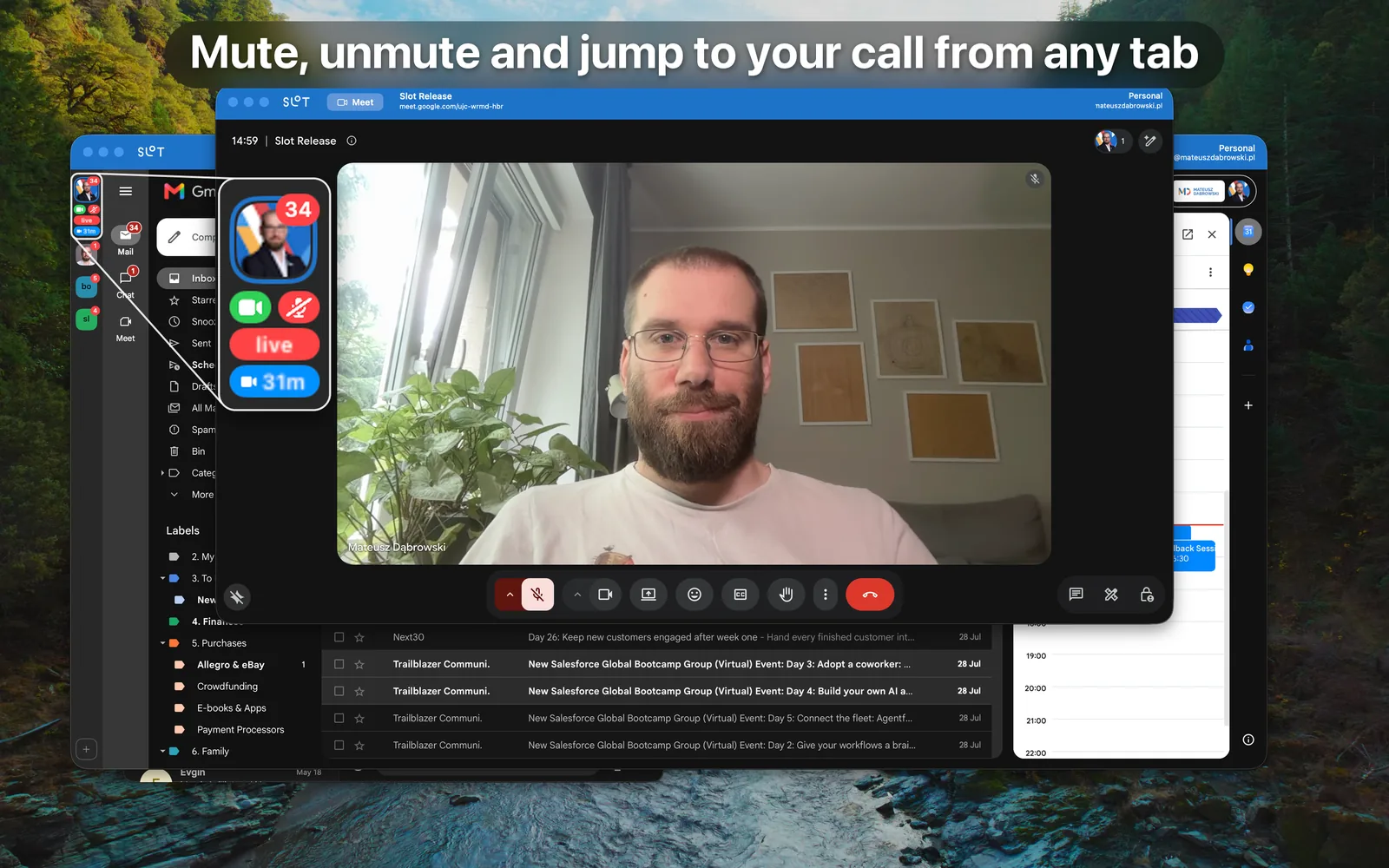
› A live pill for the call you are on - mute camera or mic from any tab
› mailto: links that ask which account should send
› Each account's links routed to the browser you chose
› Docs, Sheets, Slides, Word, Excel and PowerPoint in their own windows
› All nineteen Google and Microsoft apps, each on or off per account
› Every account in its own isolated session, enforced by macOS
› Three local notes with checklists, one click from any window
› One purchase - no subscription, ever
What's inside
Unread You Can Actually See
Slot watches every account for new mail, so counts appear on the Dock icon and on every account tile without you opening a single tab, and a New marker tells you a new message arrived since you last looked. Notifications are native, name the sender and subject, and are configurable per account - including quiet hours and a pause for a set number of days, so a work account can go quiet at 18:00 while a personal one does not.
Meetings Before They Start
Paste your calendar's private address once and Slot shows what is coming up under each account, with a reminder at the lead times you choose. The calendar is parsed on your Mac - recurring events, exceptions, time zones and all - with no sign-in and no account access beyond that one address. All-day blocks stay out of the way, and a Join button takes you straight into the call. Once you are on it, the call becomes a live pill under its account's tile, and the camera and microphone controls sit right beside it - mute and unmute from any tab, on any account.
Every Link, the Right Account
Make Slot your mail handler and every mailto: asks which account should send. Links going the other way are routed per account too: send one account's links to Chrome and another's to Safari, or keep them inside Slot - so the Jira link in a work mail opens in the browser that is signed in as work. Any tab can be pulled out into its own window and tiled beside another account's, and every window says whose it is.
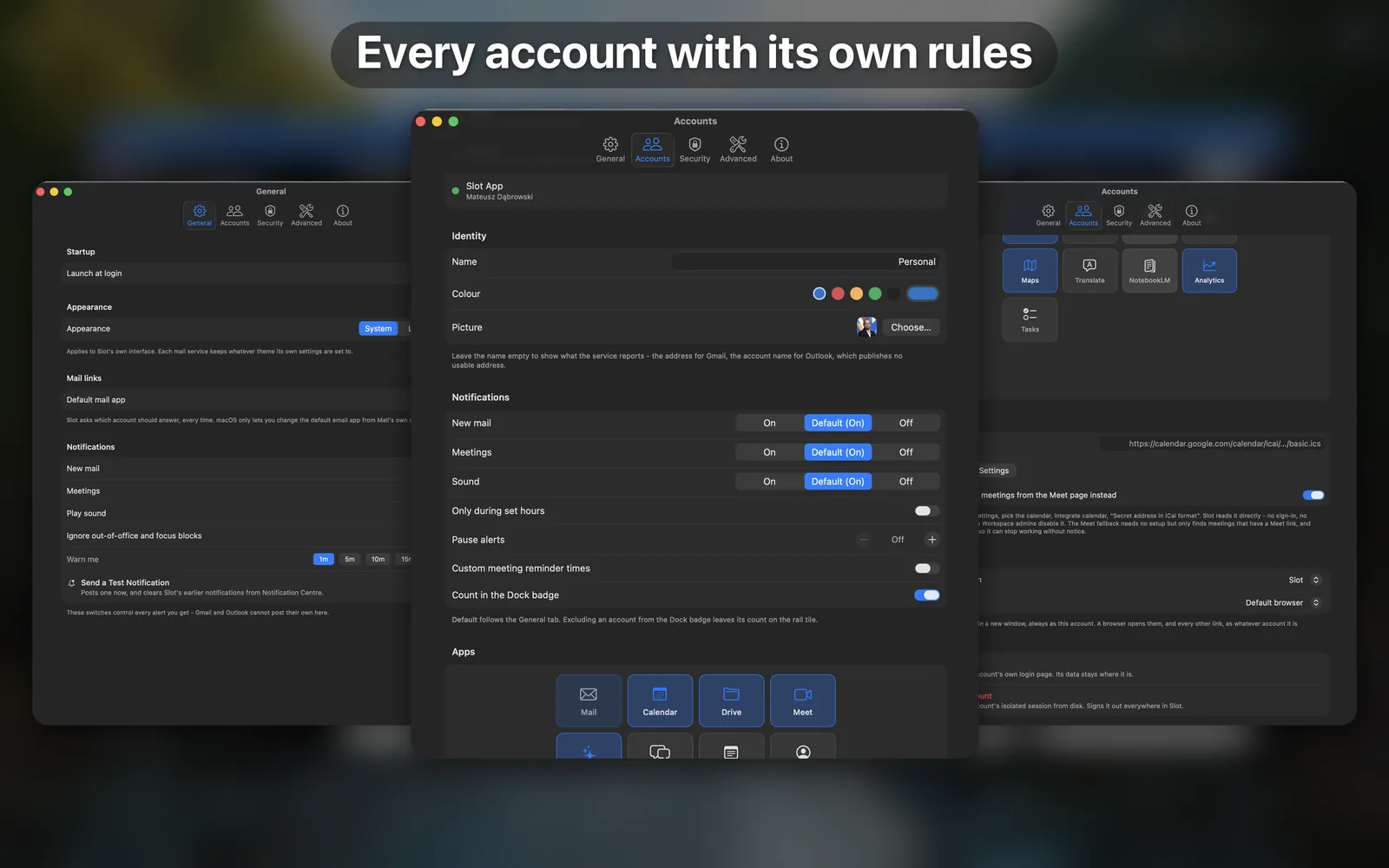
Accounts That Cannot See Each Other
Every account runs in its own website data store - separate cookies, separate sessions, separate caches. This is not a profile switcher and not a private window: the separation is the architecture, not a setting - enforced by macOS, so no page in one account can reach anything in another. Give each account its own colour and the whole window tells you which identity you are in before you read a word.
Your Day and Your Notes, Everywhere
The Agenda shows every account's meetings on one timeline, with overlaps marked - even when the clash is between two different accounts. Check what awaits you tomorrow, or take a quick peek into the year with week numbers and weekends marked, and click any empty hour to start a new event in selected account's calendar. Next to it you have Slot's notes: three tabs for quick to-do lists, meeting notes or personal notes. Both open from the rail - and from the title bar of every call and document window. What is next and what you meant to write down stay one click away everywhere in Slot.
Nothing Reaches Me
No account to create, no servers of mine, no analytics, no telemetry, no crash reporting and no third-party code of any kind. Slot never asks for, reads or stores your password - sign-in happens on your provider's own page.
Yours to Lock
Require Touch ID to open Slot, and camera and microphone go only to Meet and Teams - no other page can even ask. Removing an account deletes all of its data.
Support
Need help, found a bug, or want to suggest a feature? Email [email protected]. Include your macOS version and which provider the account is with - it makes most issues quicker to diagnose. I read every email.
Frequently asked questions
Is my mail stored on my Mac?
No. Slot shows Google's and Microsoft's own web apps, so your mail, files and calendar stay on their servers exactly as they do in a browser. Slot is not an offline client and does not download your mailbox. What it keeps locally is small: your account list, its settings, each account's session, and the three notes you write in Slot itself - RTF files on your Mac, never uploaded.
Do my accounts share a login?
Never. Each account has its own website data store, so cookies and sessions from one are invisible to the others. That is the whole point of the app - you can be signed into two Google accounts at once without either knowing about the other, and without a private window.
My passkey doesn't work when signing in.
Passkeys and iCloud Keychain autofill need entitlements Apple grants only to browsers, so they cannot work inside any app that hosts a web view - Slot included. Choose another sign-in method, usually your password plus your normal second factor. Slot tells you this before you reach the sign-in page rather than letting it fail silently.
Which accounts can I add?
Google accounts - personal Gmail or Workspace - and Microsoft accounts, both consumer Outlook and work or school tenants. Other providers are not yet supported.
My admin has disabled calendar feed addresses.
Some Workspace administrators hide the secret iCal address. For Google accounts, Slot can instead read today's Meet-linked meetings from the Meet page - switch on the fallback in Settings → Accounts → Calendar feed. It only finds meetings that have a Meet link, and it reads Google's own page, so it can stop working when they redesign it.
Can I open two accounts side by side?
Yes. Right-click any tab and choose Open as Window. The tab stays in the strip, the surface moves into its own window carrying that account's colour and name, and macOS tiles it like any other window.
Does Slot support [feature X]?
The current scope is described above. If the feature you need isn't there, write in - I read every email and feature requests inform what ships next.
Useful details to include:
- A short description of what happened.
- What you expected to happen.
- The Slot build number (visible in Settings → About).
- Your macOS version.
- Which provider the account is with, and whether it is personal or work.
- A screenshot, if relevant - with anything private cropped out.
Privacy Policy
Last updated: July 30, 2026
Slot is built by Mateusz Dąbrowski. This policy explains what the Slot app does with your data. The short version: Slot sends nothing to me, and it keeps every account apart from every other one. The longer version matters, because Slot is a container for accounts you already have with Google and Microsoft, and a lot of what happens inside it is between you and them.
What Slot is, and whose policy applies
Slot puts each of your Google and Microsoft accounts in its own window, with its own storage. When you use Gmail, Google Calendar, Drive, Meet, Outlook, Teams or any other surface inside Slot, you are using that company's own web application. Their code runs, their servers are contacted, and their privacy policies govern it - exactly as they would in a browser tab.
- Google: policies.google.com/privacy
- Microsoft: privacy.microsoft.com/privacystatement
This policy covers the part that is mine: the app itself.
Nothing reaches me
I operate no servers for Slot. There is no account to create, no sign-in to Slot itself, and no way for your data to reach me. Slot contains no analytics, no telemetry, no crash reporting, no advertising identifiers and no third-party SDKs of any kind - it is built entirely against Apple's own frameworks and bundles no other company's code.
The only way to send me anything is to choose Send Feedback in Settings, which opens a new message to [email protected] in your mail app. You write it, you decide what is in it, and you send it.
Accounts are kept apart
Every account gets its own isolated data store. Cookies, sessions and site data from one account are invisible to every other one - this is what lets a work and a personal Google account be signed in at the same time without either being aware of the other, and it is enforced by macOS, not by Slot being careful.
Slot never asks for, reads, stores or logs your password. Signing in happens on your provider's own sign-in page, inside a web view, and Slot runs no script on it. Session cookies live inside the account's store, managed by the system; Slot does not read them except to send the Gmail unread request described below, and it never copies them anywhere.
What Slot keeps on your Mac
All of this stays on your Mac, in Slot's own container. None of it is uploaded anywhere.
- Your account list - for each account: a name, any name you set yourself, the address the account reports, the colour you chose, which surfaces you enabled, which browser opens its links, your notification and quiet-hours settings, the calendar feed address if you added one, and the last unread count Slot showed you.
- Profile pictures - the picture shown on the account rail, cached as a file.
- App settings - appearance, notification and sound preferences, meeting reminder lead times, and whether Slot asks for Touch ID on unlock.
- Each account's website data - cookies, local storage and caches, held by macOS in that account's isolated store.
- Your notes - the Slot notes are kept as ordinary RTF files in Slot's Application Support folder. They belong to no account, they are never transmitted anywhere, just used locally by Slot.
Attachments you download go to a folder you pick once through the system's own panel - Downloads by default. Addresses you copy go to the clipboard. Both are ordinary macOS behaviour and both are yours.
What Slot itself sends, and where
Beyond the provider pages you are using, Slot makes exactly four kinds of request of its own:
- Your unread count, from
mail.google.com, about once a minute for each signed-in Google account, using that account's own session. The reply contains your address, the unread count, and the sender and subject of the newest unread message. - Your profile picture, from
googleusercontent.com, once per account. This request carries no cookies. - Your calendar feed, but only if you paste an address into Settings - and then only to the address you pasted. Slot accepts
httpsaddresses only, sends no cookies and no sign-in, and re-fetches at most every five minutes while it is open. If you have not added a feed, no such request is ever made. - An attachment you asked to print, from Gmail's own attachment hosts, only at the moment you press Command-P in Gmail's attachment viewer, using that account's own session. The file goes to the print panel and is then deleted - it is never saved to Downloads and never kept.
Two things are worth stating plainly. The calendar feed address is a secret in itself - anyone holding it can read that calendar - which is why Slot refuses to send it unencrypted and refuses an address with a password in it. And when you have chosen to open a document in an external browser, Slot adds your account's address to the link so the right account opens; that link then goes to the browser you picked, and to the provider.
What Slot reads from the pages it shows
Slot reads a small number of specific things out of provider pages so it can show them natively. It installs no permanent scripts, registers no channel a page could call into, and bundles no JavaScript of its own. There are four reads, all one-shot and read-only:
- The address of your profile picture, from the Gmail page's own header.
- Your unread count and display name, from the Outlook mailbox page, together with the sender and subject of the newest message - the same three things the Gmail feed carries, so a notification can say who wrote.
- Today's meeting times and titles from the Google Meet page - only if you switched on the Meet fallback, which exists for accounts whose administrator has disabled calendar feeds.
- The address of the attachment Gmail is showing you, and only at the moment you press Command-P while its viewer is open. Slot looks at pictures and frames, never at text, and asks for one address so it can print that file instead of the mailbox behind it.
None of them reads a form field, a password, a cookie or a session token, and none reads the body of your mail. Nothing read this way is sent anywhere by Slot.
Notifications
When Slot tells you about new mail, the notification carries the account name, the sender, and the subject line - the same preview any mail app shows. Meeting reminders carry the meeting's title. macOS keeps notifications in Notification Center until they are cleared, which is the system's own storage, not Slot's. You can switch mail or meeting notifications off entirely, per account or globally, in Settings.
Camera and microphone
Slot requests the camera and microphone only for video calls, and grants them only to Google Meet and Microsoft Teams. Any other page in any account is refused, by Slot, before macOS is asked. You are asked once per account and the answer is remembered; deny it and everything else keeps working.
Deleting your data
Removing an account in Slot deletes that account's entire website data store - cookies, sessions, caches - along with its picture and its settings. Nothing is kept for later.
To remove everything at once, delete Slot and then remove ~/Library/Containers/mdpl.slot. Signing out is separate: your accounts at Google and Microsoft are unaffected by anything you do in Slot, and are managed with those companies.
Children's privacy
Slot is not directed at children. It requires accounts with Google or Microsoft, which have their own age requirements, and it displays whatever those services display.
Changes to this policy
If the policy changes, I'll update the "Last updated" date above and post the new version at the same URL. Material changes will be called out in the app's release notes.
Contact
Questions about this policy or about Slot's data handling: [email protected].