MCE AgentExchange Solutions
Fill the feature gaps with plug-and-play apps. Solution highlights from Salesforce MCE's AgentExchange.
AgentExchange (formerly known as AppExchange) is an app store for various Clouds within Salesforce Customer 360 platform. You will find in-house solutions from Salesforce Labs and 3rd party. Free and paid. Good and bad. But all - validated by Salesforce Security Review.
The new name arrived in 2026, when Salesforce unified AppExchange, Slack Marketplace, and Agentforce components - agents, actions, and prompt templates now sit next to the classic apps. For the solutions below, the rebrand changed nothing: existing listings, reviews, and links carried over untouched.
From over 4500 solutions available there, only around 100 are for Salesforce Marketing Cloud Engagement (MCE). Here, I will focus only on those I had some experience with.
This document is a living thing. New solutions keep popping up, and old ones sometimes disappear or are recreated. I try to keep it up-to-date, but your help with this task will be appreciated.
When is AgentExchange worth it?
Before we jump into specific solutions available in the store, let's talk about whether you should consider going through AgentExchange offerings. This question is especially relevant with how feature-packed and customizable MCE is. And not that easy to answer when you assess all decision drivers.
1. Define feature requirements
Ok, you want a feature and are eager to find a solution to deliver it. Now stop. Before opening the AgentExchange repository, you should dive deep into the exact requirements the solution has to fulfil.
Key things to consider:
- What it needs to do - what is the minimum valuable outcome, and what is an ideal one?
- How it needs to do it - does it have to be a user-friendly no-code solution, or is a developer-oriented approach acceptable?
- Where it needs to do it - does it have to be done within MCE, or can it be external?
- Who needs to do it - do you have the resources to implement it, or should it be outsourced?
- What is the budget - does it have to be free, cheap, or you can pay for good value?
Those requirements should be aligned with the final users and be clear enough to serve as a guardrail for making an informed decision.
2. Validate out-of-the-box options
Once you have requirements, it's time to check what already is within your MCE license. Over the years, Salesforce baked in many solutions, so you might find something already there, just waiting to be used.
Not all solutions are available by default - some require a support ticket to be enabled. Check out my list of features on-demand to see if there is anything hidden that might fulfil your requirements.
However, even if your requirement has an out-of-the-box solution, it doesn't always mean the end of the work. You need to check whether it is good and easy enough:
- Good Enough: Just because there is something, it might not meet all the requirements you gathered in the first step. Maybe it is too basic for your needs or doesn't have access to all data you want to leverage. It is where you start seeing the benefits of the prework.
- Easy Enough: Even if the solution is good enough, it might not be easy enough. Always assess the solution by considering the knowledge and skills of the end users - not yours (unless you will be the only end user, of course).
If the out-of-the-box solution checks both boxes - you hit the jackpot and can leverage what is already there.
Else, it's time to look somewhere... else.
3. Free AgentExchange Solutions
Time to check whether there is any free solution available on demand. You can do it by going to marketing AgentExchange and applying filters to get Free solutions dedicated to MCE.
To manage your expectations: for Salesforce MCE, the list won't be long. And even then, you have to make sure the app is genuinely offering a meaningful free tier. Expect free Salesforce Labs solutions (like Query Studio covered below) and little pearls made by 3rd parties - like Content Builder asset finder DESelect Search.
If you are lucky enough to find something free in AgentExchange related to your requirements, check whether it is good enough. Just as you did in the previous step.
No luck? Before checking the paid filter in AgentExchange, there is one more approach to consider.
4. Custom Solution
A decade ago, building a custom solution for every requirement was all the rage. Since then, the platforms and their 3rd party ecosystems have grown significantly, making this approach much less tempting. Why?
There are four things to consider:
- Can you build a Custom solution? This can be done using in-house developers or outsourced to external specialists, but you need either skills or a budget.
- Will it be good enough? If you have the means, building a custom is easy. But do you have enough skills or budget to make a good solution that will be user-friendly, optimized, polished and matching all your requirements?
- Will it be cheaper than AgentExchange? Sure, with enough time and money, you can build something good enough. But will it be more affordable than a similar solution available in the paid section of AgentExchange?
- Will you maintain it? Even if you answered yes to the previous three points, you must consider maintenance. In most cases, building a custom is just the beginning. Requirements change, new needs happen, platforms get updated and require refactor. With AgentExchange solutions, it should be much less of a worry in the long term.
While the list might look like a hard pass for custom solutions, there is a place for them. Especially on the ends of the spectrum. Simple, but lifesaving micro solutions (Cloud Page Apps, Code Resources) or custom behemoths aligned to all non-negotiable quirks and features of your internal processes.
However, if you hit a hard "no" to any of the above questions, it's time to visit the AgentExchange again.
5. Paid AgentExchange Solutions
Here we are. After defining the requirements, we haven't found anything worthy among the out-of-the-box solutions, the land of the free AgentExchange was barren, and the custom work didn't seem like the best choice. Paid AgentExchange it is. But is it really?
Assuming you found a paid solution, you still need to assess whether it will be good enough. The positive part here? If you see only small pieces missing from the ideal, you might talk with the solution creators and discuss prioritization of the future changes.
However, you also need to keep in mind the budget. Not only the subscription cost but also implementation, training, and enhancements. After considering all that, will you still see a return on investment? If yes - you are good to go.
If not, it's time to update your requirements - the list of needed features or the budget size - and start again.
Sounds complex? Would you rather have a visual guide? Got you covered:
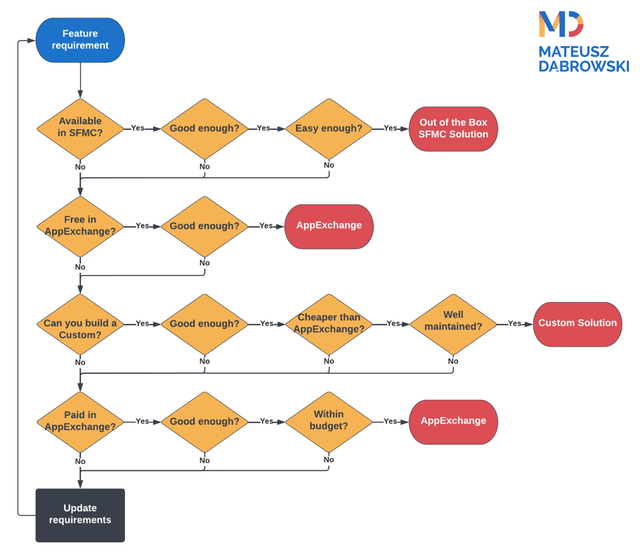
Looks complex? Would you rather have an example-based walkthrough? Got you covered as well in the next chapter:
MCE Segmentation Solutions
Finding the right approach to database segmentation is one of the critical elements of successful marketing automation. In Salesforce MCE, it's a complex topic because (spoiler) there is no perfect - powerful, simple and free - solution. You need to choose your priorities.
Looks like excellent use case to test the "Is AgentExchange worth it?" process on a real-life scenario, so let's check how it works.
1. Feature Requirements
Let me paraphrase the user story constraints I encounter on nearly every implementation:
- As a company, I want to have segmentation based on our comprehensive data so that we can send the right communication to the right persons at the right time.
- As a marketer, I want to have a drag and drop segmentation so that it is fast and easy to deliver correctly built segments.
Let's split it into crucial things to consider:
- What it needs to do - Segment the database using multiple data points.
- How it needs to do it - Simple drag and drop solution.
- Where it needs to do it - Within MCE.
- Who needs to do it - Undecided, but no internal resources for implementation.
- What is the budget - No budget.
Does it sound familiar? ;)
2. Out-of-the-box options
There are two ways to segment contacts in MCE core. Filtered Data Extensions and SQL Query Activities. How do they stack against our requirements?
Filtered Data Extensions are free, require nearly no implementation (apart from setting Data Relationships), work directly in MCE, and are a simple drag and drop solution, but... They don't support segmenting on more than two Data Extensions. Not good enough.
SQL Query Activities are free, require no implementation, work directly in MCE and allow segmenting on multiple data points, but... demand SQL skills. It means training requirements, slower segmentation and a higher risk of errors by inexperienced users. Not easy enough.
3. Free AgentExchange
Filtering the AgentExchange for free solutions will show only one related to segmentation - Query Studio. While it's a great tool, it's still a SQL-based solution. It's also not an end-to-end tool for segmentation purposes. Not good enough.
4. Custom Solution
There are two base options for the drag and drop custom solution approach.
First - generator that modifies predefined segments. It's relatively simple to build, but it allows you to make only minor adaptations of the templated query, mostly on filtering (SQL WHERE). Very limited and requires hard coding for each new segment template. Not good enough and hard to maintain.
Second - fully-fledged visual wrapper over SQL queries. Full power with a drag and drop interface. Sounds like a dream? Correct. Such solution requires a lot of work and testing. The cost would skyrocket well above (spoiler alert) what is available in the paid section of AgentExchange. Not worth it.
5. Paid AgentExchange
Finally, we get to the last stop. After a quick search, we can find two solutions: tried and tested DESelect Segment and the new contender Activation Studio. More details on them in a moment, but from the perspective of this exercise - both are subscription based, while one of the key things to consider was the beloved "no budget".
Therefore we get to the update requirements step, where the company needs to prioritize between powerful, simple and free.
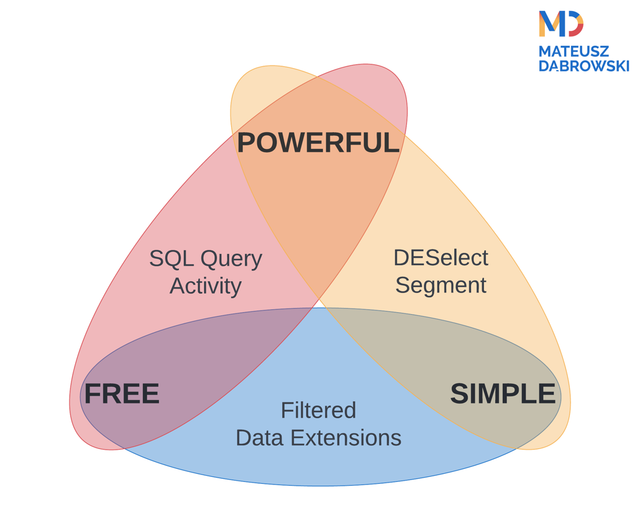
I hope it is now easier to find when AgentExchange can solve MCE requirements. With that, let's jump to the solutions available there.
AgentExchange Solutions for MCE
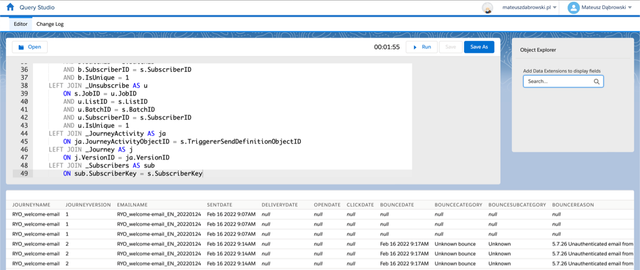
Query Studio
| Creator | Pricing |
|---|---|
| Salesforce Labs | Free |
The Good
Query Studio solves two problems:
- MCE SQL Query Testing
- MCE SQL Data Exploratory Analysis
Why did I call it problems?
Because the only out-of-the-box solution for working with SQL in MCE is Query Activity in Automation Studio. It allows you to validate whether your query is valid, but checking if the outcomes are as expected is a pain.
You can see the results only after manually creating a data extension with the correct columns (names, data types, lengths) and executing the Query Activity. Outcomes are suboptimal and need to make some changes? The Data Extension needs a rework.
It sometimes happens when you are writing and testing a new query. It happens all the time when you are doing exploratory analysis.
Query Studio automatically builds a temporary Data Extension to store the query's output on every execution. It also displays a subset of outcomes below your SQL so you can quickly check whether it aligns with your expectations.
And that's not all - Query Studio lets you save your work as ready-to-use Query Activities. Even in a way that is impossible through the Automation Studio (like query targeting Auto-Suppression List)!
The Bad
However, Query Studio is not perfect. The main issue is that it has implemented a different (and not that good) query validation. The outcome?
While every query you write in Query Studio will work in Query Activity, it is not always true the other way round. For example, Query Studio won't let you use comments, parentheses in the first line of the SELECT statement, TOP PERCENT, CAST in SELECT and more that are not a problem in Query Activity.
It also has very poor error messages making it hard to debug your queries properly. Sometimes it is helpful to copy the SQL to Query Activity and validate there to get a better response.
Finally, while it creates a temporary Data Extension on execution, it is not helpful as a template for the final solution because all fields have a Text data type regardless of the real data.
The Sum Up
Despite some quirks, Query Studio is a huge timesaver and quality of life improvement. Useful for creating queries, debugging outcomes, and quick checks on Data Views. Free. A must-have for any SQL-enabled or learning-to-be-enabled team.
AgentExchangeMCE Schema Explorer
| Creator | Pricing |
|---|---|
| Salesforce Labs | Free |
Schema Explorer is a new tool directly from Salesforce Labs that maps your MCE data ecosystem - Data Extensions, Journeys, Automations, and how they depend on each other - into one visual schema.
MCE has no built-in data lineage view, so understanding how objects relate is usually tribal knowledge held by whoever built the instance. Schema Explorer also connects to an Agentforce agent, so you can ask questions about your own data model instead of clicking through Contact Builder to find out.
It's free, made available by Salesforce Labs, and actively developed. Definitely worth checking out if you are a Salesforce Marketing Cloud Engagement architect or administrator.
AgentExchangeDESelect Segment
| Creator | Pricing |
|---|---|
| DESelect | Paid |
DESelect Segment is the golden standard for the middle ground between the very limited Filtered Data Extensions and yes-code SQL Queries. Actually, "middle ground" is not fair.
Over time, DESelect team polished it to cover nearly all use cases that were possible only with SQL in the past. It makes the app more of a no-code alternative to Query Activities then an enhanced Filtered Data Extensions.
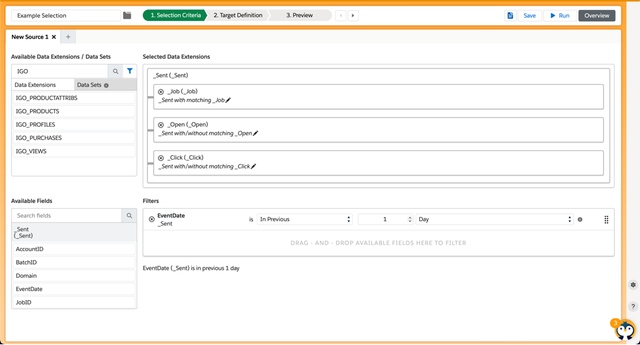
In a fully drag and drop experience, DESelect Segment can:
- Join multiple data points (both Data Extensions and Data Views)
- Create complex, multilevel filters (using dynamic dates, aggregates and checks against other Data Extensions)
- Build final Data Extension on demand with selected or custom-created columns
- Deduplicate the data using specified logic
- Preview the outcomes to validate the configuration
And it doesn't stop there. There are features not available in the out-of-the-box MCE experience that lets you:
- Create Picklists to mitigate typo issues when working with set lists of values
- Build Data Sets that works as templated multi-table relationships for quick drag and drop
- Share segmentation templates across Business Units to speed up rolling solutions
While the features sound great, true magic happens when you use them together. Why? Because they allow you to create your segment in one place, start to finish.
The out-of-the-box path for query segmentation is:
- Write and test segmentation query in Query Studio (with Contact Builder in another tab to check the values)
- Manually create Data Extension that has all needed columns in correct data types and lengths in Contact Builder
- Fix it in Email Studio because Content Builder is bugged around CustomerKey and default Current Date
- Copy the query to Query Activity in Automation Studio
- [Optionally] Create Automation
DESelect Segment can do all of it in a single, streamlined process using guided creator. Faster, simpler and less intimidating to beginners. Available right in the MCE main menu.
While I'm a big fan of SQL, I know it's not a tool for everyone. If you want SQL-level segmentation without hiring for SQL skills toward it, DESelect is the tool for you.
DESelect Segment builds the segments with SQL for you as standard Query Activities. You can see the SQL behind the scenes.
But it doesn't use Automations. Instead, it runs the Query Activities directly from their server using API calls. The data still stays in your MCE instance, but you are not burning the [yearly Automation execution limit](TODO LINK TO LICENCE LIMITS ARTICLE).
If you are running a lot of segments, it can singificantly offset the subscription cost of DESelect Segment.
DESelect Engage
| Creator | Pricing |
|---|---|
| DESelect | Paid |
DESelect Engage is a different DESelect product from Segment - it doesn't touch who you send to, it caps how often you send to them, applying frequency capping and saturation control across campaigns and Business Units.
MCE has nothing native for this and while you can implement it with complex SQL queries it will be massive amount of work, maintenance, and [yearly Automation execution limit](TODO LINK TO LICENCE LIMITS ARTICLE) burn. Without it, avoiding over-messaging the same contact comes down to campaign owners informally coordinating with each other. Engage replaces that with rule-based prioritisation (transactional beats newsletter, newsletter beats ad hoc, etc) and visibility into saturation, even for contacts sitting in multiple Business Units.
If you struggle with oversaturation, Engage is worth taking a look at. Managing your marketing pressure is key to keeping your contacts engaged and your deliverability healthy.
DESelect Search
| Creator | Pricing |
|---|---|
| DESelect | Free |
DESelect Search does one thing: it searches every object in MCE - Data Extensions, automations, query activities, content blocks, and more - by name or external key, across Business Units.
MCE's folder-based navigation has no cross-object search at all, so "where did I put that Data Extension" usually means digging through nested folders by hand. Search replaces that with a single search box, installed once for the whole team.
It's free and it solves a genuine daily annoyance. You can easily build it yourself as a [Cloud Page App](TODO LINK TO CLOUD PAGE APP ARTICLE), but if you have more interesting tasks at hand, DESelect Search is a polished, ready-to-go solution.
Activation Studio
| Creator | Pricing |
|---|---|
| Harvest Tech Labs | Paid, 30-day free trial |
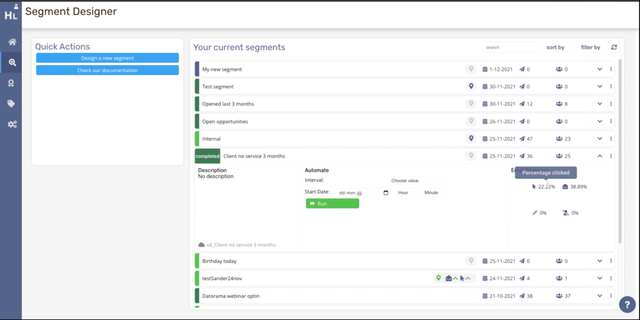
Activation Studio bolts drag-and-drop segmentation, lead scoring, and lightweight web tracking onto MCE through three modules - Segment Designer, Score Designer, and Interaction Designer - that you can buy separately or as a bundle.
Its Segment Designer trades DESelect Segment's flexibility and power for something narrower but faster and less technical: it builds on Attribute Groups you've already defined in Contact Builder Data Designer, so relationships come pre-wired instead of hand-built. Score Designer is much more unique feature, as it adds simple lead scoring model that was always a gap for MCE.
I'd reach for it over DESelect Segment specifically for smaller and less technicalMCE teams that just want to drag & drop segments on their static data model and enhance it with a built-in lead scoring.
Qairy
| Creator | Pricing |
|---|---|
| QAiry | Freemium |
Qairy skips the filter-building UI entirely and replaces it with a chat box: describe the audience in plain English (or other language) and its AI writes and runs the underlying SFMC-compatible SQL for you, returning a segment or Data Extension.
That's a genuinely different approach to no-code segmentation than the drag-and-drop tools above. It works against your existing data model, supports scheduled refresh, and only ever sends Data Extension metadata to the AI, never row-level data, so your contact data stays inside SFMC.
The key limitation is related to your metadata quality. AI works best when your data extensions, descriptions and fields are well-named and separated. If you have dozens of similar DEs with cryptic or duplicated columns, the AI will struggle to understand what you mean.
There is a free tier, but it only covers Data Views reporting. Good for testing, or simplyfying quick reporting, but not segmentation. It also won't let you check how problematic your data model is before you pay.
Marketing Cloud Connect Toolbox
| Creator | Pricing |
|---|---|
| Lightbox Logic | Paid |
Marketing Cloud Connect Toolbox extends the standard Marketing Cloud Connect package by surfacing MCE email, SMS, WhatsApp, and Push activity directly on Salesforce CRM records.
Standard Marketing Cloud Connect gives Sales and Service Cloud only limited visibility into what MCE actually sent (and IERs generally are a pain to setup and maintain). This toolbox closes that gap without copying MCE data into CRM storage, so a rep sees engagement history without leaving Salesforce.
You can create a basic version of it with LWC component and MCE API, but MCC Toolbox provides much more with option to sync emails to Cloud Storage of your choice and showing the visuals of the email in the CRM record. This provides both much more detailed visibility for your Sales and Service teams, but also helps with compliance of storing messaging sent to customers.
It earns its place when Sales or Service reps genuinely need that send visibility on the CRM record - if your teams live entirely in MCE, skip it.
Stashr
| Creator | Pricing |
|---|---|
| Avagate | Freemium |
Stashr backs up, version-controls, and recovers MCE assets - Content Builder, Data Extension and Automation Studio configurations, Web Studio CloudPages and Code Resources - with change monitoring that flags what changed, line by line.
MCE has no native backup or version history for most of this (MCE Package Manager is not even close for that purpose). Delete or overwrite something by mistake and it's gone for good. Stashr's free tier covers manual backup of three configurations up to 50 assets each, which is enough to try it on a real project before paying, though recovery only reaches as far back as the day you installed it.
Nice way to add a bit of peace of mind to your MCE operations and even the free tier might be enough to secure the most important and complex assets.
Inbox Monster
| Creator | Pricing |
|---|---|
| Inbox Monster | Paid |
Inbox Monster pairs pre-send email QA with post-send deliverability monitoring: inbox placement, spam traps, sender reputation, plus SMS signal tracking.
MCE's native preview tools don't get you rendering across real inbox clients or ongoing reputation monitoring at this depth, so Inbox Monster is filling a genuine gap rather than duplicating something MCE half-does already. It also has a direct integration with MCE, so you can use it without leaving the platform.
It's built - and priced - for high-volume senders where deliverability is a revenue line, not a side concern. For a smaller MCE team, Emails on Acid might be a more suitable option.